


Add an App
Modern Add an App Experience gives you the features needed to create an app in App Builder.
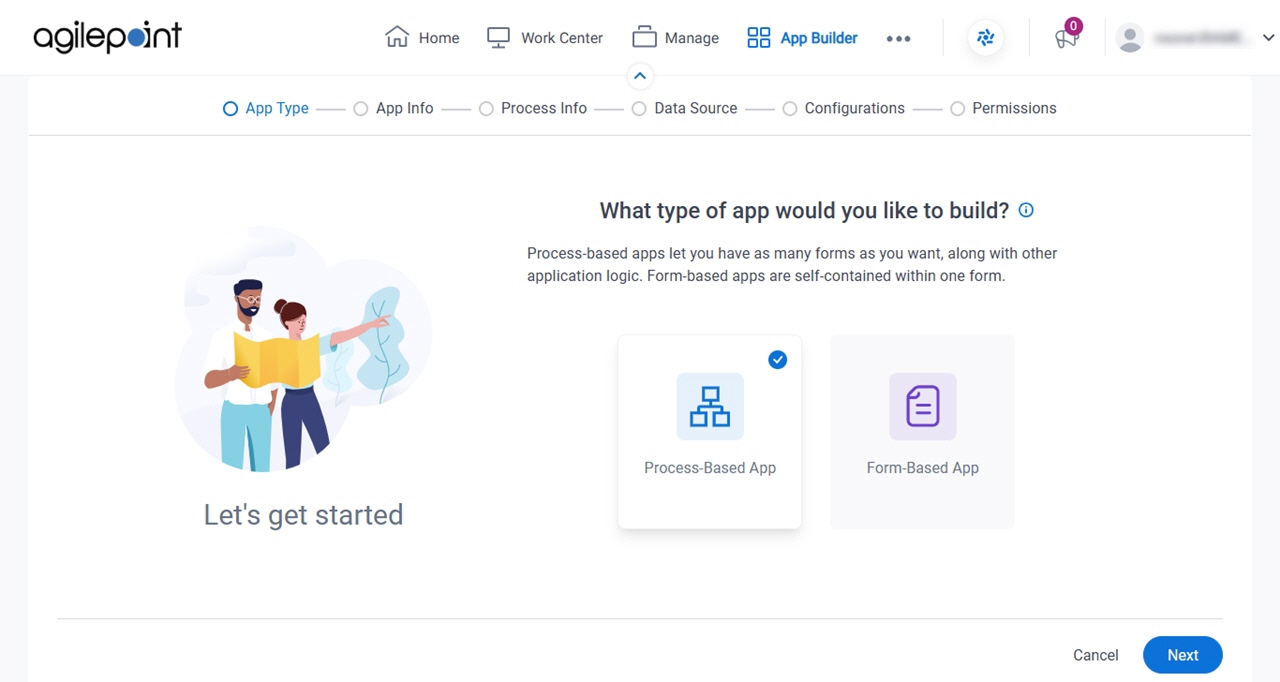
With Modern Add an App Experience, you can:
- Create an app using wizard that is free from technical jargon.
- Use GenAI to create your process, your form, or both.
- Create your process from a prompt, image, or PDF file.
- Create your form from a prompt, image, PDF file, Excel file, or data source, such as a database, SharePoint or Salesforce.
- Configure your process activities and form fields right in App Builder.
- Apply a form layout based on an image or PDF file.
- Step through a checklist of common app dependencies, such as:
- Apply a style to your app
- Target the app to groups and roles
- Add images to use in your app
- Add custom JavaScript or CSS
- Define permissions and securely share your app for co-authoring and ownership.
Examples
- (External) GenAI for Building Master – Detail Forms
- (External) Go from an Idea to Enterprise Business Process App in Minutes
- (External) GenAI is Here to Build Your Form-Based Apps
- (External) Pixels to Productivity: Generative AI Turns Images into Apps
- (External) From PDF to an App in a Snap using GenAI
- (External) AgilePoint + Generative AI: From Spreadsheets to Smart Apps
- Examples - Step-by-step use case examples, information about what types of examples are provided in the AgilePoint NX Product Documentation, and other resources where you can find more examples.
Questions to Answer Before You Start
Before you start creating an AgilePoint NX app, you must make several decisions. Depending upon the decisions you make, you may need to create some files or gather some information before you get started.
- Do you want to create a process-based app, or a form-based app?
Before you start, it is a good idea to understand the detailed requirements for your app.
- If you are creating a process-based app, do you want GenAI to create the process, or do you want to create the process yourself?
- If you want GenAI to create your process, what method do you want to use?
These are the options:
- Use an image file as the template.
For this option you will need an image file that depicts your process.
- Use a PDF file as the template.
For this option you will need a PDF file that depicts your process.
- Enter a prompt.
To increase the accuracy, it is recommended that you craft your prompt in advance. Be as specific as possible.
- Use an image file as the template.
- Do you want GenAI to create the form for your app, or do you want to create the form yourself?
- If you want GenAI to create your form, what method do you want to use?
- Use a data source as a model.
The following options are available:
- An entity in Data Entities.
For this option you will need an entity in Data Entities that includes the data fields you want to use on your form.
- A database table
For this option you will need a database table that includes columns corresponding to fields you want for your form.
- A Microsoft Excel table.
For this option you will need an Excel file formatted as table that includes columns corresponding to fields you want for your form.
- An entity in Salesforce,
For this option you will need an entity in Salesforce that includes the data fields you want to use on your form.
- A SharePoint list.
For this option you will need a SharePoint list that includes columns corresponding to fields you want for your form.
- An entity in Data Entities.
- Use a Microsoft Excel file as the template.
- Use an image file as the template.
- Use a PDF file as the template.
- Enter a prompt.
- Use a data source as a model.
- If you want GenAI to create your form based on a data source, or you want to create the form yourself, what data source do you want to use for your form?
The following options are available:
- An entity in Data Entities.
For this option you will need an entity in Data Entities that includes the data fields you want to use on your form.
- A database table
For this option you will need a database table that includes columns corresponding to fields you want for your form.
- A Microsoft Excel table.
For this option you will need an Excel file formatted as table that includes columns corresponding to fields you want for your form.
- An entity in Salesforce,
For this option you will need an entity in Salesforce that includes the data fields you want to use on your form.
- A SharePoint list.
For this option you will need a SharePoint list that includes columns corresponding to fields you want for your form.
- An entity in Data Entities.
- Do you want to use an image or PDF file to specify the layout for your form?
For this option you will need an image or PDF file that depicts your form layout.
- Do you want to add any CSS files, JavaScript files, image files, document repositories, or
other resources to your app?
For this option you will need the CSS files, JavaScript files, and other resources ready to upload, configure, or connect.
- If you are creating a form-based app, do you want to turn on notifications?
- What permission groups do you want to add to your app?
If your organization uses permission groups, it is recommended to know the minimum permission groups required for your app before you start building it. You can always change these later, but you need to at least identify the App Owners and the minimum App Designers.
Process-Based App With No GenAI Assistance
This section provides the step order within the Documentation if you do not use GenAI to create your process or form.
It is not required that you use this document to follow this procedure. The steps and links are provided for a convenience for users who may find it useful. For example, a user may want to share a specific path with their team.
Process-Based App, No GenAI, Data Entities Data Source
Use this path if you selected the following options:
- Create a process-based app.
- Create the process yourself.
- Create the form yourself.
- Use Data Entities as the data source for the form.
Follow this path in the Add an App Experience Documentation:
Process-Based App, No GenAI, Database Data Source
Use this path if you selected the following options:
- Create a process-based app.
- Create the process yourself.
- Create the form yourself.
- Use a database table as the data source for the form.
Follow this path in the Add an App Experience Documentation:
Process-Based App, No GenAI, Microsoft Excel Data Source
Use this path if you selected the following options:
- Create a process-based app.
- Create the process yourself.
- Create the form yourself.
- Use a Microsoft Excel file as the data source for the form.
Follow this path in the Add an App Experience Documentation:
Process-Based App, No GenAI, Salesforce Data Source
Use this path if you selected the following options:
- Create a process-based app.
- Create the process yourself.
- Create the form yourself.
- Use Salesforce as the data source for the form.
Follow this path in the Add an App Experience Documentation:
Process-Based App, No GenAI, SharePoint Data Source
Use this path if you selected the following options:
- Create a process-based app.
- Create the process yourself.
- Create the form yourself.
Follow this path in the Add an App Experience Documentation:
Process-Based App With No GenAI: Create the Process Myself, Auto-Generate Form Based On A Data Source
This section provides the step order within the Documentation if you do not use GenAI to create your process and use GenAI to generate your form based on a data source.
It is not required that you use this document to follow this procedure. The steps and links are provided for a convenience for users who may find it useful. For example, a user may want to share a specific path with their team.
Process-Based App, No GenAI Process, GenAI Form, Data Entities Data Source
Use this path if you selected the following options:
- Create a process-based app.
- Create the process yourself.
- Use GenAI to generate the form based on a data source.
- Use Data Entities as the data source for the form.
Follow this path in the Add an App Experience Documentation:
Process-Based App, No GenAI Process, GenAI Form, Database Data Source
Use this path if you selected the following options:
- Create a process-based app.
- Create the process yourself.
- Use GenAI to generate the form based on a data source.
- Use a database table as the data source for the form.
Follow this path in the Add an App Experience Documentation:
Process-Based App, No GenAI Process, GenAI Form, Microsoft Excel Data Source
Use this path if you selected the following options:
- Create a process-based app.
- Create the process yourself.
- Use GenAI to generate the form based on a data source.
- Use a Microsoft Excel file as the data source for the form.
Follow this path in the Add an App Experience Documentation:
Process-Based App, No GenAI Process, GenAI Form, Salesforce Data Source
Use this path if you selected the following options:
- Create a process-based app.
- Create the process yourself.
- Use GenAI to generate the form based on a data source.
- Use Salesforce as the data source for the form.
Follow this path in the Add an App Experience Documentation:
Process-Based App, No GenAI Process, GenAI Form, SharePoint Data Source
Use this path if you selected the following options:
- Create a process-based app.
- Create the process yourself.
- Use GenAI to generate the form based on a data source.
- Use SharePoint as the data source for the form.
Follow this path in the Add an App Experience Documentation:
Process-Based App With GenAI: Create the Process Based on an Image File, Create the Form from a Data Source
This section provides the step order within the Documentation if you use GenAI to create your process based on an image file and create your form from a data source.
It is not required that you use this document to follow this procedure. The steps and links are provided for a convenience for users who may find it useful. For example, a user may want to share a specific path with their team.
Process-Based App, GenAI Process, Image for Process, No GenAI Form, Data Entities Data Source
Use this path if you selected the following options:
- Create a process-based app.
- Generate the process with AI.
- Use an image file as the template for the process.
- Create the form yourself.
- Use Data Entities as the data source for the form.
Follow this path in the Add an App Experience Documentation:
Process-Based App, GenAI Process, Image for Process, No GenAI Form, Database Data Source
Use this path if you selected the following options:
- Create a process-based app.
- Generate the process with AI.
- Use an image file as the template for the process.
- Create the form yourself.
- Use a database table as the data source for the form.
Follow this path in the Add an App Experience Documentation:
Process-Based App, GenAI Process, Image for Process, No GenAI Form, Microsoft Excel Data Source
Use this path if you selected the following options:
- Create a process-based app.
- Generate the process with AI.
- Use an image file as the template for the process.
- Create the form yourself.
- Use a Microsoft Excel file as the data source for the form.
Follow this path in the Add an App Experience Documentation:
Process-Based App, GenAI Process, Image for Process, No GenAI Form, Salesforce Data Source
Use this path if you selected the following options:
- Create a process-based app.
- Generate the process with AI.
- Use an image file as the template for the process.
- Create the form yourself.
- Use Salesforce as the data source for the form.
Follow this path in the Add an App Experience Documentation:
Process-Based App, GenAI Process, Image for Process, No GenAI Form, SharePoint Data Source
Use this path if you selected the following options:
- Create a process-based app.
- Generate the process with AI.
- Use an image file as the template for the process.
- Create the form yourself.
- Use SharePoint as the data source for the form.
Follow this path in the Add an App Experience Documentation:
Process-Based App, GenAI Process, Image for Process, GenAI Form, Data Entities Data Source
Use this path if you selected the following options:
- Create a process-based app.
- Generate the process with AI.
- Use an image file as the template for the process.
- Use GenAI to generate the form based on a data source.
- Use Data Entities as the data source for the form.
Follow this path in the Add an App Experience Documentation:
Process-Based App, GenAI Process, Image for Process, GenAI Form, Database Data Source
Use this path if you selected the following options:
- Create a process-based app.
- Generate the process with AI.
- Use an image file as the template for the process.
- Use GenAI to generate the form based on a data source.
- Use a database table as the data source for the form.
Follow this path in the Add an App Experience Documentation:
Process-Based App, GenAI Process, Image for Process, GenAI Form, Microsoft Excel Data Source
Use this path if you selected the following options:
- Create a process-based app.
- Generate the process with AI.
- Use an image file as the template for the process.
- Use GenAI to generate the form based on a data source.
- Use a Microsoft Excel file as the data source for the form.
Follow this path in the Add an App Experience Documentation:
Process-Based App, GenAI Process, Image for Process, GenAI Form, Salesforce Data Source
Use this path if you selected the following options:
- Create a process-based app.
- Generate the process with AI.
- Use an image file as the template for the process.
- Use GenAI to generate the form based on a data source.
- Use Salesforce as the data source for the form.
Follow this path in the Add an App Experience Documentation:
Process-Based App, GenAI Process, Image for Process, GenAI Form, SharePoint Data Source
Use this path if you selected the following options:
- Create a process-based app.
- Generate the process with AI.
- Use an image file as the template for the process.
- Use GenAI to generate the form based on a data source.
- Use SharePoint as the data source for the form.
Follow this path in the Add an App Experience Documentation:
Process-Based App With GenAI: Create the Process Based on a PDF File, Create the Form from a Data Source
This section provides the step order within the Documentation if you use GenAI to create your process based on a PDF file and create your form from a data source.
It is not required that you use this document to follow this procedure. The steps and links are provided for a convenience for users who may find it useful. For example, a user may want to share a specific path with their team.
Process-Based App, GenAI Process, PDF for Process, No GenAI Form, Data Entities Data Source
Use this path if you selected the following options:
- Create a process-based app.
- Generate the process with AI.
- Use a PDF file as the template for the process.
- Create the form yourself.
- Use Data Entities as the data source for the form.
Follow this path in the Add an App Experience Documentation:
Process-Based App, GenAI Process, PDF for Process, No GenAI Form, Database Data Source
Use this path if you selected the following options:
- Create a process-based app.
- Generate the process with AI.
- Use a PDF file as the template for the process.
- Create the form yourself.
- Use a database table as the data source for the form.
Follow this path in the Add an App Experience Documentation:
Process-Based App, GenAI Process, PDF for Process, No GenAI Form, Microsoft Excel Data Source
Use this path if you selected the following options:
- Create a process-based app.
- Generate the process with AI.
- Use a PDF file as the template for the process.
- Create the form yourself.
- Use a Microsoft Excel file as the data source for the form.
Follow this path in the Add an App Experience Documentation:
Process-Based App, GenAI Process, PDF for Process, No GenAI Form, Salesforce Data Source
Use this path if you selected the following options:
- Create a process-based app.
- Generate the process with AI.
- Use a PDF file as the template for the process.
- Create the form yourself.
- Use Salesforce as the data source for the form.
Follow this path in the Add an App Experience Documentation:
Process-Based App, GenAI Process, PDF for Process, No GenAI Form, SharePoint Data Source
Use this path if you selected the following options:
- Create a process-based app.
- Generate the process with AI.
- Use a PDF file as the template for the process.
- Create the form yourself.
- Use SharePoint as the data source for the form.
Follow this path in the Add an App Experience Documentation:
Process-Based App, GenAI Process, PDF for Process, GenAI Form, Data Entities Data Source
Use this path if you selected the following options:
- Create a process-based app.
- Generate the process with AI.
- Use a PDF file as the template for the process.
- Use GenAI to generate the form based on a data source.
- Use Data Entities as the data source for the form.
Follow this path in the Add an App Experience Documentation:
Process-Based App, GenAI Process, PDF for Process, GenAI Form, Database Data Source
Use this path if you selected the following options:
- Create a process-based app.
- Generate the process with AI.
- Use a PDF file as the template for the process.
- Use GenAI to generate the form based on a data source.
- Use a database table as the data source for the form.
Follow this path in the Add an App Experience Documentation:
Process-Based App, GenAI Process, PDF for Process, GenAI Form, Microsoft Excel Data Source
Use this path if you selected the following options:
- Create a process-based app.
- Generate the process with AI.
- Use a PDF file as the template for the process.
- Use GenAI to generate the form based on a data source.
- Use a Microsoft Excel file as the data source for the form.
Follow this path in the Add an App Experience Documentation:
Process-Based App, GenAI Process, PDF for Process, GenAI Form, Salesforce Data Source
Use this path if you selected the following options:
- Create a process-based app.
- Generate the process with AI.
- Use a PDF file as the template for the process.
- Use GenAI to generate the form based on a data source.
- Use Salesforce as the data source for the form.
Follow this path in the Add an App Experience Documentation:
Process-Based App, GenAI Process, PDF for Process, GenAI Form, SharePoint Data Source
Use this path if you selected the following options:
- Create a process-based app.
- Generate the process with AI.
- Use a PDF file as the template for the process.
- Use GenAI to generate the form based on a data source.
- Use SharePoint as the data source for the form.
Follow this path in the Add an App Experience Documentation:
Process-Based App With GenAI: Create the Process Based on Prompt, Create the Form from a Data Source
This section provides the step order within the Documentation if you use GenAI to create your process based on a prompt and create your form from a data source.
It is not required that you use this document to follow this procedure. The steps and links are provided for a convenience for users who may find it useful. For example, a user may want to share a specific path with their team.
Process-Based App, GenAI Process, Prompt for Process, No GenAI Form, Data Entities Data Source
Use this path if you selected the following options:
- Create a process-based app.
- Generate the process with AI.
- Enter a prompt to create the process.
- Create the form yourself.
- Use Data Entities as the data source for the form.
Follow this path in the Add an App Experience Documentation:
Process-Based App, GenAI Process, Prompt for Process, No GenAI Form, Database Data Source
Use this path if you selected the following options:
- Create a process-based app.
- Generate the process with AI.
- Enter a prompt to create the process.
- Create the form yourself.
- Use a database table as the data source for the form.
Follow this path in the Add an App Experience Documentation:
Process-Based App, GenAI Process, Prompt for Process, No GenAI Form, Microsoft Excel Data Source
Use this path if you selected the following options:
- Create a process-based app.
- Generate the process with AI.
- Enter a prompt to create the process.
- Create the form yourself.
- Use a Microsoft Excel file as the data source for the form.
Follow this path in the Add an App Experience Documentation:
Process-Based App, GenAI Process, Prompt for Process, No GenAI Form, Salesforce Data Source
Use this path if you selected the following options:
- Create a process-based app.
- Generate the process with AI.
- Enter a prompt to create the process.
- Create the form yourself.
- Use Salesforce as the data source for the form.
Follow this path in the Add an App Experience Documentation:
Process-Based App, GenAI Process, Prompt for Process, No GenAI Form, SharePoint Data Source
Use this path if you selected the following options:
- Create a process-based app.
- Generate the process with AI.
- Enter a prompt to create the process.
- Create the form yourself.
- Use SharePoint as the data source for the form.
Follow this path in the Add an App Experience Documentation:
Process-Based App, GenAI Process, Prompt for Process, GenAI Form, Data Entities Data Source
Use this path if you selected the following options:
- Create a process-based app.
- Generate the process with AI.
- Enter a prompt to create the process.
- Use GenAI to generate the form based on a data source.
- Use Data Entities as the data source for the form.
Follow this path in the Add an App Experience Documentation:
Process-Based App, GenAI Process, Prompt for Process, GenAI Form, Database Data Source
Use this path if you selected the following options:
- Create a process-based app.
- Generate the process with AI.
- Enter a prompt to create the process.
- Use GenAI to generate the form based on a data source.
- Use a database table as the data source for the form.
Follow this path in the Add an App Experience Documentation:
Process-Based App, GenAI Process, Prompt for Process, GenAI Form, Microsoft Excel Data Source
Use this path if you selected the following options:
- Create a process-based app.
- Generate the process with AI.
- Enter a prompt to create the process.
- Use GenAI to generate the form based on a data source.
- Use a Microsoft Excel file as the data source for the form.
Follow this path in the Add an App Experience Documentation:
Process-Based App, GenAI Process, Prompt for Process, GenAI Form, Salesforce Data Source
Use this path if you selected the following options:
- Create a process-based app.
- Generate the process with AI.
- Enter a prompt to create the process.
- Use GenAI to generate the form based on a data source.
- Use Salesforce as the data source for the form.
Follow this path in the Add an App Experience Documentation:
Process-Based App, GenAI Process, Prompt for Process, GenAI Form, SharePoint Data Source
Use this path if you selected the following options:
- Create a process-based app.
- Generate the process with AI.
- Enter a prompt to create the process.
- Use GenAI to generate the form based on a data source.
- Use SharePoint as the data source for the form.
Follow this path in the Add an App Experience Documentation:
Process-Based App With GenAI: Create the Process Based on an Image File, Create the Form from an Excel File, Image, PDF, or Prompt
This section provides the step order within the Documentation if you use GenAI to create your process based on an image file and create your form from an Excel file, PDF file, image file, or a prompt.
It is not required that you use this document to follow this procedure. The steps and links are provided for a convenience for users who may find it useful. For example, a user may want to share a specific path with their team.
Process-Based App, GenAI Process, Image for Process, GenAI Form, Excel for Form
Use this path if you selected the following options:
- Create a process-based app.
- Generate the process with AI.
- Use an image file as the template for the process.
- Use GenAI to create the form.
- Use an Excel file as the template for the form.
Follow this path in the Add an App Experience Documentation:
Process-Based App, GenAI Process, Image for Process, GenAI Form, Image for Form
Use this path if you selected the following options:
- Create a process-based app.
- Generate the process with AI.
- Use an image file as the template for the process.
- Use GenAI to create the form.
- Use an image file as the template for the form.
Follow this path in the Add an App Experience Documentation:
Process-Based App, GenAI Process, Image for Process, GenAI Form, PDF for Form
Use this path if you selected the following options:
- Create a process-based app.
- Generate the process with AI.
- Use an image file as the template for the process.
- Use GenAI to create the form.
- Use a PDF file as the template for the form.
Follow this path in the Add an App Experience Documentation:
Process-Based App, GenAI Process, Image for Process, GenAI Form, Prompt for Form
Use this path if you selected the following options:
- Create a process-based app.
- Generate the process with AI.
- Use an image file as the template for the process.
- Use GenAI to create the form.
- Enter a prompt to create the form.
Follow this path in the Add an App Experience Documentation:
Process-Based App With GenAI: Create the Process Based on a PDF File, Create the Form from an Excel File, Image, PDF, or Prompt
This section provides the step order within the Documentation if you use GenAI to create your process based on a PDF file and create your form from an Excel file, PDF file, image file, or a prompt.
It is not required that you use this document to follow this procedure. The steps and links are provided for a convenience for users who may find it useful. For example, a user may want to share a specific path with their team.
Process-Based App, GenAI Process, PDF for Process, GenAI Form, Excel for Form
Use this path if you selected the following options:
- Create a process-based app.
- Generate the process with AI.
- Use a PDF file as the template for the process.
- Use GenAI to create the form.
- Use an Excel file as the template for the form.
Follow this path in the Add an App Experience Documentation:
Process-Based App, GenAI Process, PDF for Process, GenAI Form, Image for Form
Use this path if you selected the following options:
- Create a process-based app.
- Generate the process with AI.
- Use a PDF file as the template for the process.
- Use GenAI to create the form.
- Use an image file as the template for the form.
Follow this path in the Add an App Experience Documentation:
Process-Based App, GenAI Process, PDF for Process, GenAI Form, PDF for Form
Use this path if you selected the following options:
- Create a process-based app.
- Generate the process with AI.
- Use a PDF file as the template for the process.
- Use GenAI to create the form.
- Use a PDF file as the template for the form.
Follow this path in the Add an App Experience Documentation:
Process-Based App, GenAI Process, PDF for Process, GenAI Form, Prompt for Form
Use this path if you selected the following options:
- Create a process-based app.
- Generate the process with AI.
- Use a PDF file as the template for the process.
- Use GenAI to create the form.
- Enter a prompt to create the form.
Follow this path in the Add an App Experience Documentation:
Process-Based App With GenAI: Create the Process Based on Prompt, Create the Form from an Excel File, Image, PDF, or Prompt
This section provides the step order within the Documentation if you use GenAI to create your process based on a prompt and create your form from an Excel file, PDF file, image file, or a prompt.
It is not required that you use this document to follow this procedure. The steps and links are provided for a convenience for users who may find it useful. For example, a user may want to share a specific path with their team.
Process-Based App, GenAI Process, Prompt for Process, GenAI Form, Excel for Form
Use this path if you selected the following options:
- Create a process-based app.
- Generate the process with AI.
- Enter a prompt to create the process.
- Use GenAI to create the form.
- Use an Excel file as the template for the form.
Follow this path in the Add an App Experience Documentation:
Process-Based App, GenAI Process, Prompt for Process, GenAI Form, Image for Form
Use this path if you selected the following options:
- Create a process-based app.
- Generate the process with AI.
- Enter a prompt to create the process.
- Use GenAI to create the form.
- Use an image file as the template for the form.
Follow this path in the Add an App Experience Documentation:
Process-Based App, GenAI Process, Prompt for Process, GenAI Form, PDF for Form
Use this path if you selected the following options:
- Create a process-based app.
- Generate the process with AI.
- Enter a prompt to create the process.
- Use GenAI to create the form.
- Use a PDF file as the template for the form.
Follow this path in the Add an App Experience Documentation:
Process-Based App, GenAI Process, Prompt for Process, GenAI Form, Prompt for Form
Use this path if you selected the following options:
- Create a process-based app.
- Generate the process with AI.
- Enter a prompt to create the process.
- Use GenAI to create the form.
- Enter a prompt to create the form.
Follow this path in the Add an App Experience Documentation:
Process-Based App, No GenAI Process, GenAI Form, Excel for Form
Use this path if you selected the following options:
- Create a process-based app.
- Create the process yourself.
- Use GenAI to create the form.
- Use an Excel file as the template for the form.
Follow this path in the Add an App Experience Documentation:
Process-Based App, No GenAI Process, GenAI Form, Image for Form
Use this path if you selected the following options:
- Create a process-based app.
- Create the process yourself.
- Use GenAI to create the form.
- Use an image file as the template for the form.
Follow this path in the Add an App Experience Documentation:
Process-Based App, No GenAI Process, GenAI Form, PDF for Form
Use this path if you selected the following options:
- Create a process-based app.
- Create the process yourself.
- Use GenAI to create the form.
- Use a PDF file as the template for the form.
Follow this path in the Add an App Experience Documentation:
Process-Based App, No GenAI Process, GenAI Form, Prompt for Form
Use this path if you selected the following options:
- Create a process-based app.
- Create the process yourself.
- Use GenAI to create the form.
- Enter a prompt to create the form.
Follow this path in the Add an App Experience Documentation:
Form-Based App With No GenAI Assistance
This section provides the step order within the Documentation if you do not use GenAI to create your form.
It is not required that you use this document to follow this procedure. The steps and links are provided for a convenience for users who may find it useful. For example, a user may want to share a specific path with their team.
Form-Based App, No GenAI for Form, Data Entities Data Source
Use this path if you selected the following options:
- Create a form-based app.
- Create the form yourself.
- Use Data Entities as the data source for the form.
Follow this path in the Add an App Experience Documentation:
Form-Based App, No GenAI for Form, Database Data Source
Use this path if you selected the following options:
- Create a form-based app.
- Create the form yourself.
- Use a database table as the data source for the form.
Follow this path in the Add an App Experience Documentation:
Form-Based App, No GenAI for Form, Microsoft Excel Data Source
Use this path if you selected the following options:
- Create a form-based app.
- Create the form yourself.
- Use a Microsoft Excel file as the data source for the form.
Follow this path in the Add an App Experience Documentation:
Form-Based App, No GenAI for Form, Salesforce Data Source
Use this path if you selected the following options:
- Create a form-based app.
- Create the form yourself.
- Use Salesforce as the data source for the form.
Follow this path in the Add an App Experience Documentation:
Form-Based App, No GenAI for Form, SharePoint Data Source
Use this path if you selected the following options:
- Create a form-based app.
- Create the form yourself.
- Use SharePoint as the data source for the form.
Follow this path in the Add an App Experience Documentation:
Form-Based App, Widget Form
Use this path if you selected the following options:
- Create a form-based app.
- Create Widget Form
Follow this path in the Add an App Experience Documentation:
Form-Based App With GenAI: Create the Form from a Data Source
This section provides the step order within the Documentation if you use GenAI to create your form from a data source.
It is not required that you use this document to follow this procedure. The steps and links are provided for a convenience for users who may find it useful. For example, a user may want to share a specific path with their team.
Form-Based App, GenAI Form, Data Entities Data Source
Use this path if you selected the following options:
- Create a form-based app.
- Use GenAI to generate the form based on a data source.
- Use Data Entities as the data source for the form.
Follow this path in the Add an App Experience Documentation:
Form-Based App, GenAI Form, Database Data Source
Use this path if you selected the following options:
- Create a form-based app.
- Use GenAI to generate the form based on a data source.
- Use a database table as the data source for the form.
Follow this path in the Add an App Experience Documentation:
- Create an App
- Set Up a Form-Based App
- Select How to Create Your Form
- Configure the Data Source for Your Form (Auto-Generate Form Based On A Data Source)
- Configure Your Form (Auto-Generate Form Based On A Data Source, Database)
- Configure Additional Settings and Resources for Your App
- Configure Permission Groups for Your App
Form-Based App, GenAI Form, Microsoft Excel Data Source
Use this path if you selected the following options:
- Create a form-based app.
- Use GenAI to generate the form based on a data source.
- Use a Microsoft Excel file as the data source for the form.
Follow this path in the Add an App Experience Documentation:
- Create an App
- Set Up a Form-Based App
- Select How to Create Your Form
- Configure the Data Source for Your Form (Auto-Generate Form Based On A Data Source)
- Configure Your Form (Auto-Generate Form Based On A Data Source, Microsoft Excel)
- Configure Additional Settings and Resources for Your App
- Configure Permission Groups for Your App
Form-Based App, GenAI Form, Salesforce Data Source
Use this path if you selected the following options:
- Create a form-based app.
- Use GenAI to generate the form based on a data source.
- Use Salesforce as the data source for the form.
Follow this path in the Add an App Experience Documentation:
- Create an App
- Set Up a Form-Based App
- Select How to Create Your Form
- Configure the Data Source for Your Form (Auto-Generate Form Based On A Data Source)
- Configure Your Form (Auto-Generate Form Based On A Data Source, Salesforce)
- Configure Additional Settings and Resources for Your App
- Configure Permission Groups for Your App
Form-Based App, GenAI Form, SharePoint Data Source
Use this path if you selected the following options:
- Create a form-based app.
- Use GenAI to generate the form based on a data source.
- Use SharePoint as the data source for the form.
Follow this path in the Add an App Experience Documentation:
- Create an App
- Set Up a Form-Based App
- Select How to Create Your Form
- Configure the Data Source for Your Form (Auto-Generate Form Based On A Data Source)
- Configure Your Form (Auto-Generate Form Based On A Data Source, SharePoint)
- Configure Additional Settings and Resources for Your App
- Configure Permission Groups for Your App
Form-Based App With GenAI: Create the Form from an Excel File, Image, PDF, or Prompt
This section provides the step order within the Documentation if you use GenAI to create your form from an Excel file, PDF file, image file, or a prompt.
It is not required that you use this document to follow this procedure. The steps and links are provided for a convenience for users who may find it useful. For example, a user may want to share a specific path with their team.
Form-Based App, GenAI Form, Excel for Form
Use this path if you selected the following options:
- Create a form-based app.
- Use GenAI to create the form.
- Use an Excel file as the template for the form.
Follow this path in the Add an App Experience Documentation:
Form-Based App, GenAI Form, Image for Form
Use this path if you selected the following options:
- Create a form-based app.
- Use GenAI to create the form.
- Use an image file as the template for the form.
Follow this path in the Add an App Experience Documentation:
Form-Based App, GenAI Form, PDF for Form
Use this path if you selected the following options:
- Create a form-based app.
- Use GenAI to create the form.
- Use a PDF file as the template for the form.
Follow this path in the Add an App Experience Documentation:
Form-Based App, GenAI Form, Prompt for Form
Use this path if you selected the following options:
- Create a form-based app.
- Use GenAI to create the form.
- Enter a prompt to create the form.
Follow this path in the Add an App Experience Documentation: