Set Up a Process-Based App

This topic explains how to configure a process-based app with App Builder.

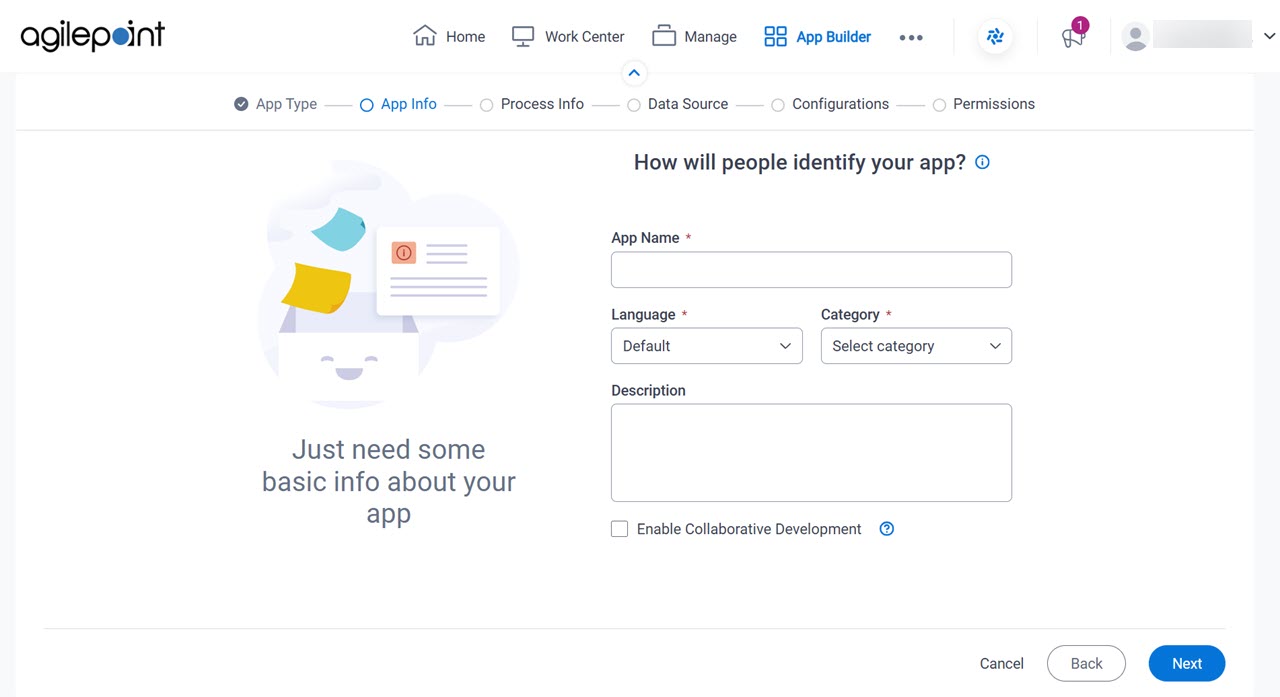
How will people identify your app? screen

Configures the basic information for your app.

Figure 1. How will people identify your app? screen

How will people identify your app screen

Fields

Field NameDefinition

App Name

Description:
Specifies a name for your app.
Allowed Values:
One line of text (a string).

Accepted:

  • Letters
  • Numbers
  • Spaces
Default Value:
None

Language

Description:
Specifies the language for your app.
Allowed Values:
A language from the list.
Default Value:
None
Accepts Variables:
No

Category

Description:
Specifies a category for your app.
Allowed Values:
A category from the list.

The category list comes from Tenant Settings > Categories tab.

Default Value:
None

Description

Description:
An optional description for your app.
Allowed Values:
More than one line of text.
Default Value:
None

Enable Collaborative Development

Description:
Specifies whether app designers can use collaborative development to work on the app.
Allowed Values:
  • Selected - App designers can use collaborative development to work on the app.
  • Deselected - Collaborative development is not enabled for the app. Only one user at a time can check out the files for the app.
Default Value:
Deselected
Example:
Refer to:
Limitations:

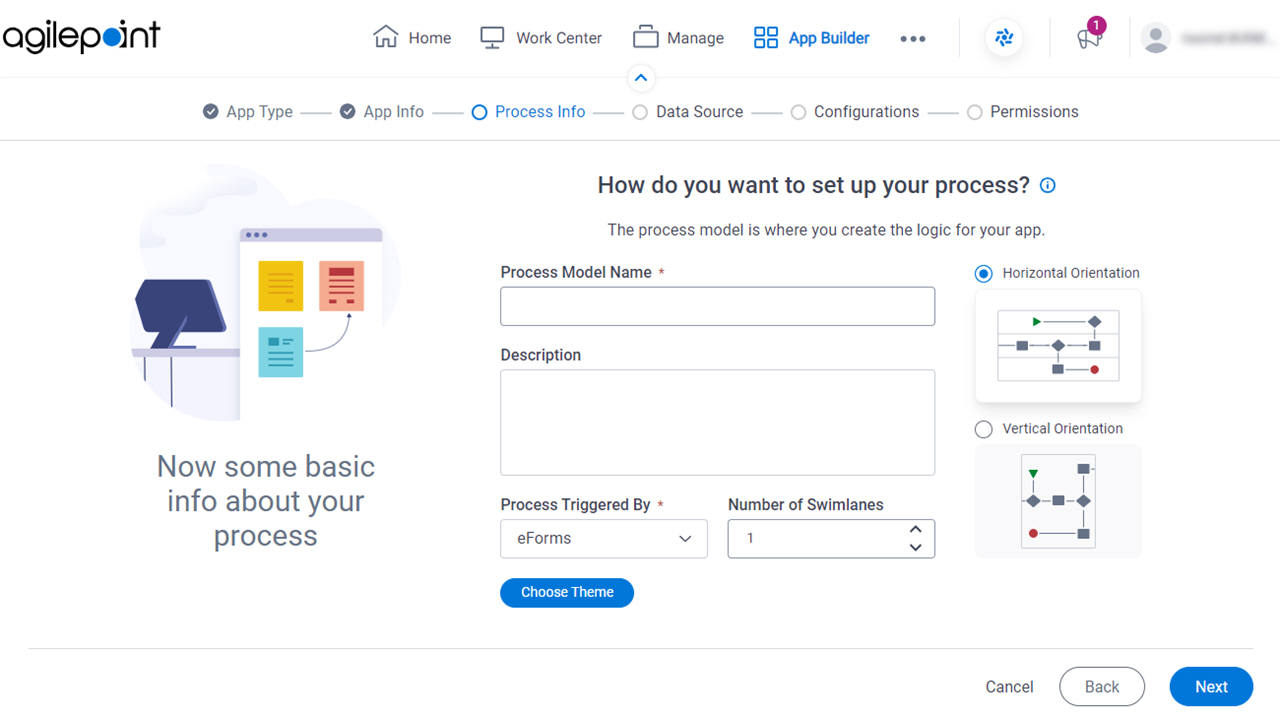
How do you want to set up your process? screen

Configures the basic information for your process.

Figure 2. How do you want to set up your process? screen

How do you want to set up your process screen

Fields

Field NameDefinition

Process Model Name

Description:
Specifies a name for the process.
Allowed Values:
One line of text (a string).

Accepted:

  • Letters
  • Numbers
  • Spaces
Default Value:
None
Accepts Variables:
No

Description

Description:
A description for the process.
Allowed Values:
More than one line of text.
Default Value:
None
Accepts Variables:
No

Process Triggered By

Description:
Specifies what causes the process to start.
Allowed Values:
  • eForms - The process starts when a user submits a form made with eForm
  • External Forms - The process starts when a user submits a form that is made with a form technology other than eForms, such as Java or ASP.NET.
  • Message/Event - The process starts when an email account receives an e-mail, a specified event occurs.
  • System Integration - A specified event happens in an external system, such as Salesforce or a database.
  • Parent Process - The process is the child, or subprocess, to another process.

    If you create a process model in a process-based app that already has a process models, this is the only option.

    The limit of one parent process model in a process-based app was enforced in AgilePoint NX OnPremises v7.0 Software Update 1. In earlier releases, this was a limit according to the license, but the options in this list allowed more than one parent process.

  • SharePoint - A specified event happens in SharePoint. For example, a user creates a list or list item.
  • InfoPath Form Services - A specified event happens in SharePoint On Premises. For example, a user submits a form.
  • Salesforce - A specified event happens in Salesforce. For example, a user creates an entity.

Default Value:
eForms

Number of Swimlanes

Description:
Specifies a number of swimlanes to be added to the Process Builder screen to organize the steps in the process.
Allowed Values:
An integer.

Range:

  • 0-20
Default Value:
1

Swimlanes Orientation

Description:
Specifies the direction for the swimlanes.
Allowed Values:
  • Horizontal - Shows the swimlanes from left to right.
  • Vertical - Shows the swimlanes from top to bottom.
Default Value:
Horizontal

Choose Theme

Description:
Specifies a process theme to show on the My Apps screen in Work Center.

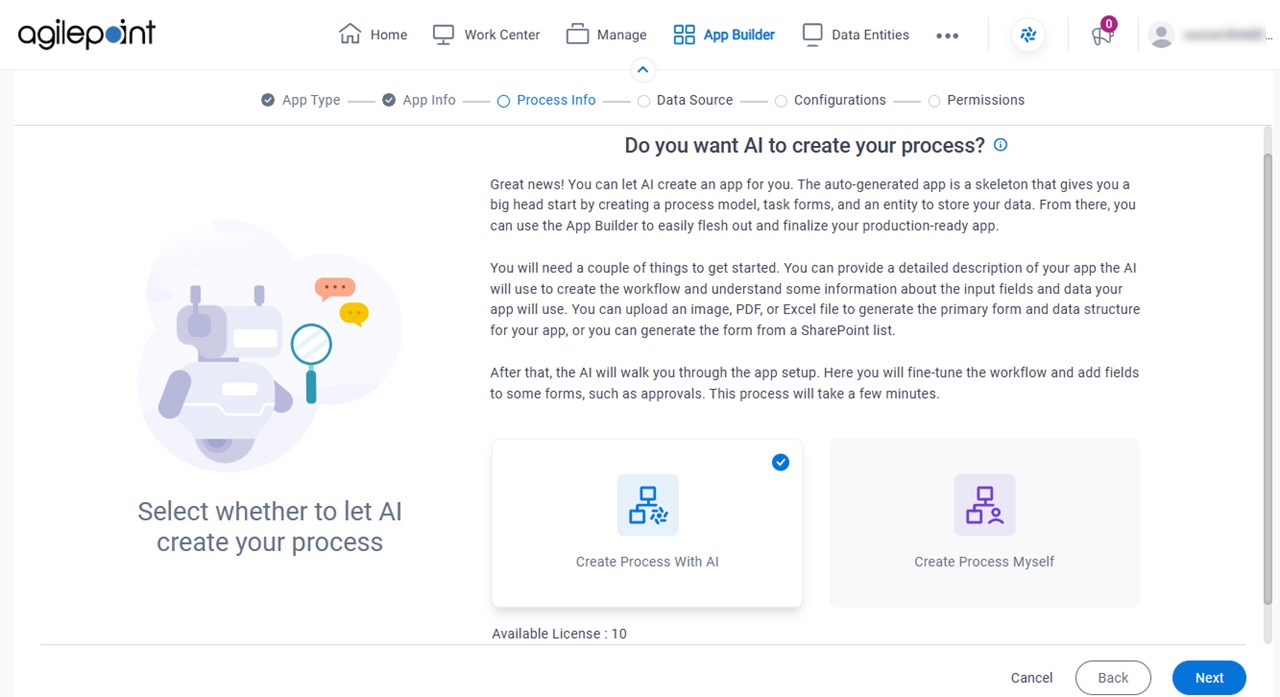
Do you want AI to create your process? screen

Specifies whether to create the process with GenAI.

Figure 3. Do you want AI to create your process? screen

Do you want AI to create your process?

Fields

Field NameDefinition

Create Process With AI / Create Process Myself

Description:
Specifies whether to create a process with GenAI.
Allowed Values:
Default Value:
Create Process With AI
Example:
Refer to: