
Analyze Image (NVIDIA NIM) activity

An activity that generates text output for an uploaded image. The generated text can be used in an AgilePoint NX app.

Nvidia NIM Analyze Image

Configure the Analyze Image activity

Examples

Prerequisites

Good to Know

How to Start

  1. Open Process Builder.

    For information about how to open this screen, refer to Process Builder.
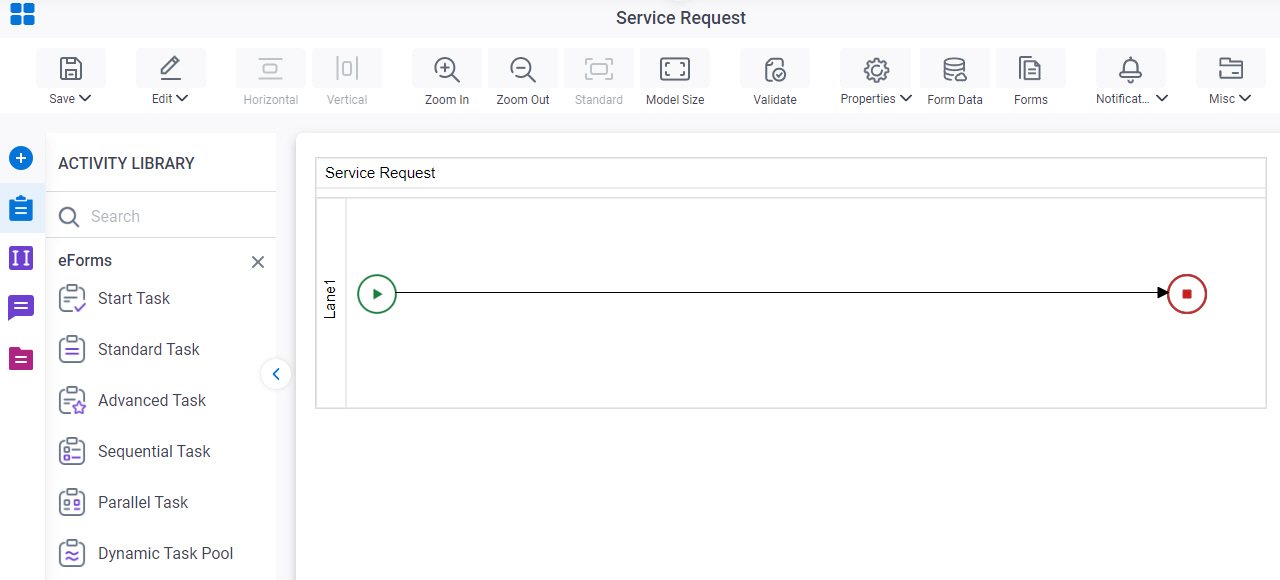

    Open Process Builder
  2. In Process Builder, in the Activity Library, open the NVIDIA NIM tab.
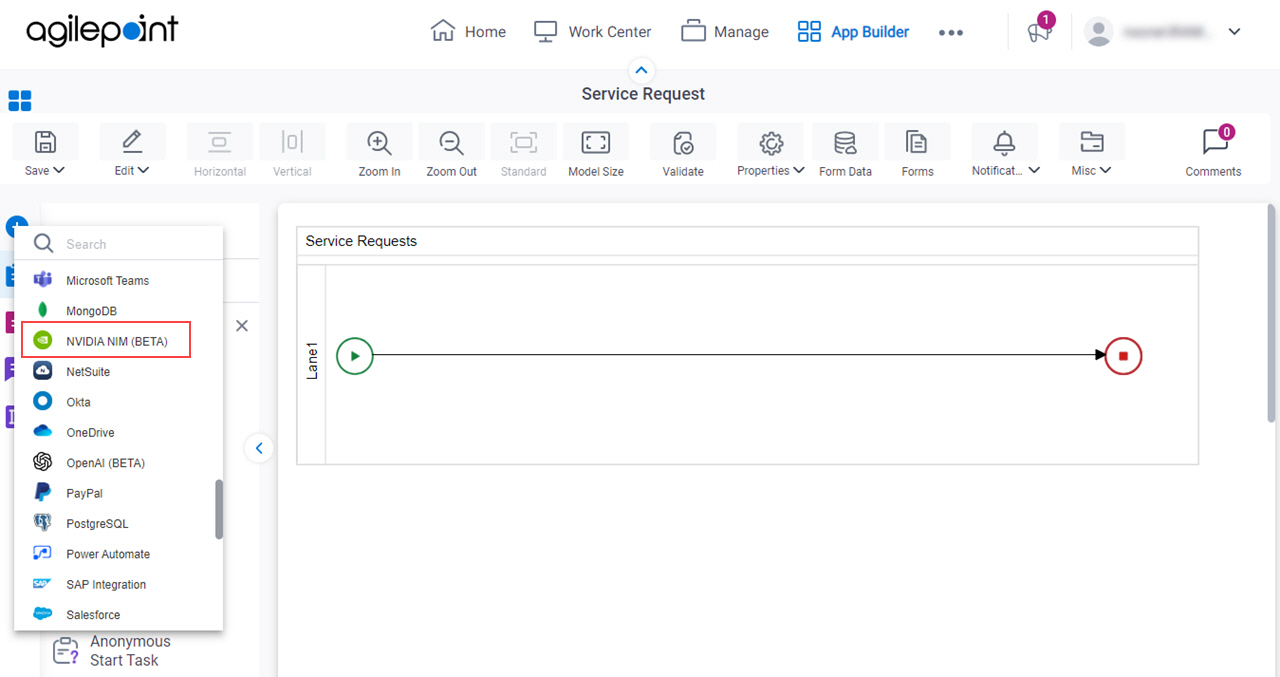
    Open NVIDIANIM tab
  3. On the NVIDIA NIM > Activities tab, drag the Analyze Image activity onto your process.
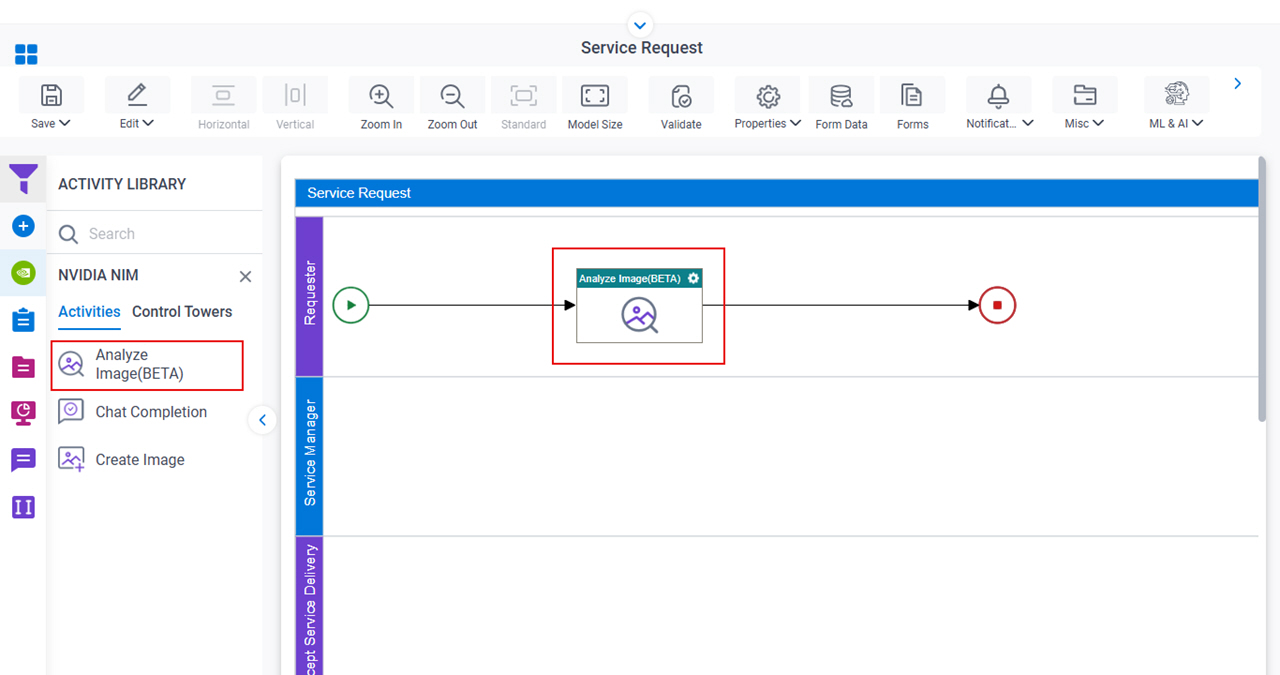
    Drag Analyze Image activity

General Configuration

Specifies the basic settings for the Analyze Image activity.
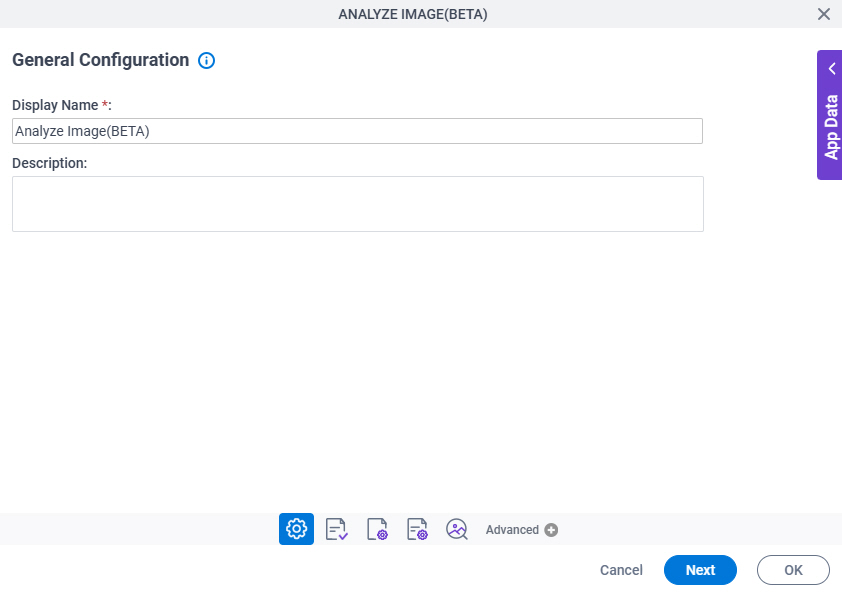
Figure 1. General Configuration screen

General Configuration screen

Good to Know

  • Documentation for this screen is provided for completeness. The fields are mostly self-explanatory.

Fields

Field NameDefinition

Display Name

Description:
Specifies the activity name that shows in your process.
Allowed Values:
One line of text (a string).

Accepted:

  • Letters
  • Numbers
  • Spaces
Default Value:
None
Accepts Variables:
No
Example:
This is a common configuration field that is used in many examples. Refer to:
  • Examples - Step-by-step use case examples, information about what types of examples are provided in the AgilePoint NX Product Documentation, and other resources where you can find more examples.

Description

Description:
Specifies an optional text description for your activity.
Allowed Values:
More than one line of text.
Default Value:
None
Accepts Variables:
No

Analyze Image Configuration > Image Location Configuration screen

Specifies the input source of an image to upload to the LLM to generate text output.
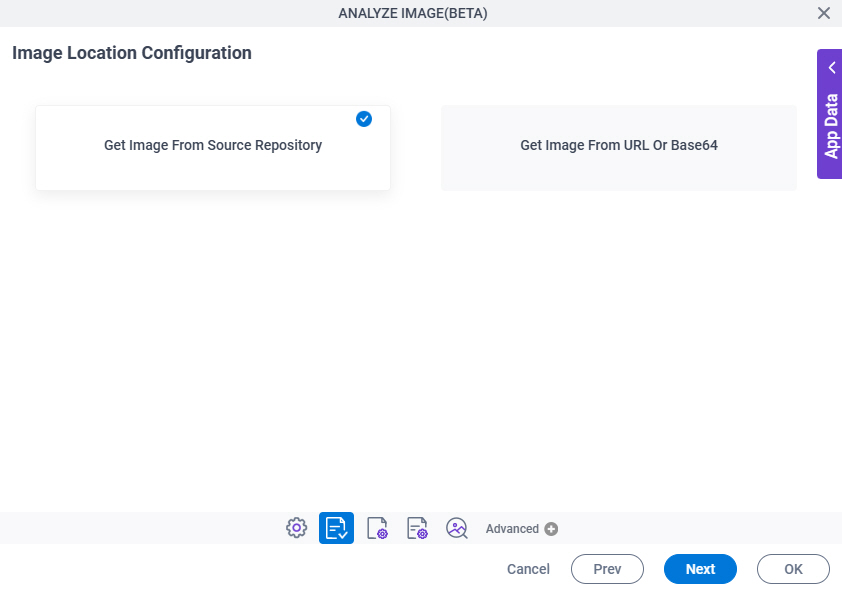
Figure 2. Analyze Image Configuration > Image Location Configuration screen

Analyze Image Configuration Image Location Configuration screen

Fields

Field NameDefinition

Get Image From Source Repository / Get Image From URL or Base64

Description:
Specifies the location from which to upload the image to the LLM.
Allowed Values:
  • Get Image From Source Repository – Configures the Source Repository screen to specify a repository to upload the image.
  • Get Image From URL Or Base64 – Specifies the URL or Base64 string of an image to upload to the LLM to generate text output.
Default Value:
Get Image From Source Repository
Limitations:

Some information about third-party integrations is outside the scope of the AgilePoint NX Product Documentation. It is the responsibility of the vendors who create and maintain these technologies to provide this information. This includes specific business use cases and examples; explanations for third-party concepts; details about the data models and input and output data formats for third-party technologies; and various types of IDs, URL patterns, connection string formats, or other technical information that is specific to the third-party technologies. For more information, refer to Where Can I Find Information and Examples for Third-Party Integrations?

URL Or Base64 For The Image

Description:
Specifies the URL or Base64 image string to upload to the LLM to analyze an image.
To Open this Field:
  1. Select Get Image From URL Or Base64.
Allowed Values:
One line of text (a string).

Represents:

  • A reference to an image.

    These requirements apply:

    • Images must be stored on a web server or cloud storage location accessible through HTTPS that AgilePoint NX can access.
    • Images cannot be stored on a local file system, such as your local machine or the AgilePoint Server machine.
    • Images must be referenced with an absolute URL or a Base64 encoded value.
Default Value:
None
Accepts Variables:
Yes
Limitations:

Some information about third-party integrations is outside the scope of the AgilePoint NX Product Documentation. It is the responsibility of the vendors who create and maintain these technologies to provide this information. This includes specific business use cases and examples; explanations for third-party concepts; details about the data models and input and output data formats for third-party technologies; and various types of IDs, URL patterns, connection string formats, or other technical information that is specific to the third-party technologies. For more information, refer to Where Can I Find Information and Examples for Third-Party Integrations?

Analyze Image Configuration > Image Location Configuration > Source Repository screen

Specifies the original, or source, location for your files.
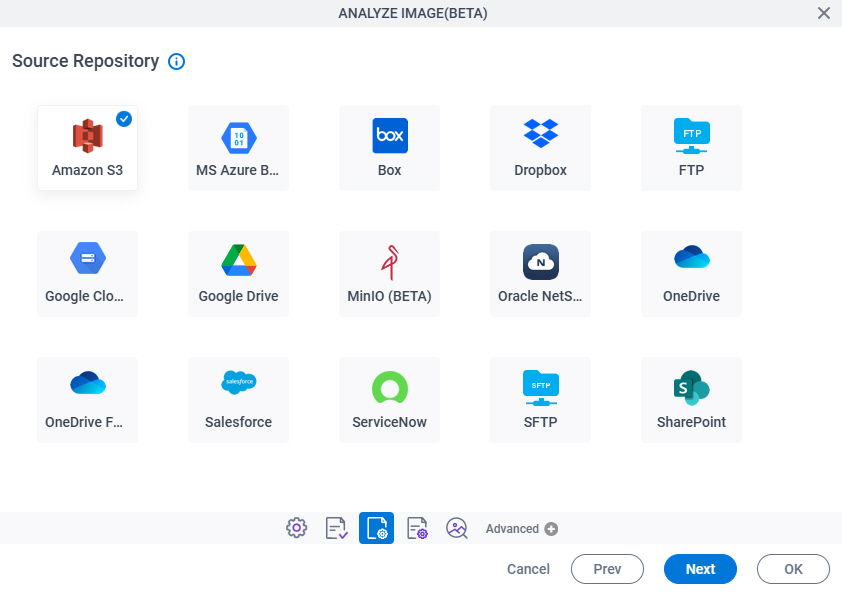
Figure 3. Analyze Image Configuration > Image Location Configuration > Source Repository screen

Analyze Image Configuration Image Selection Source Repository screen

Fields

Field NameDefinition

Source Repository

Opens this Screen:
The configuration screen for your document repository. The specific screen that shows depends on your document repository type.

For more information, refer to Document Repositories.

Function of this Screen:
Configures your document repository.

Analyze Image Configuration > Model Properties tab

Configures the LLM to generate text output.
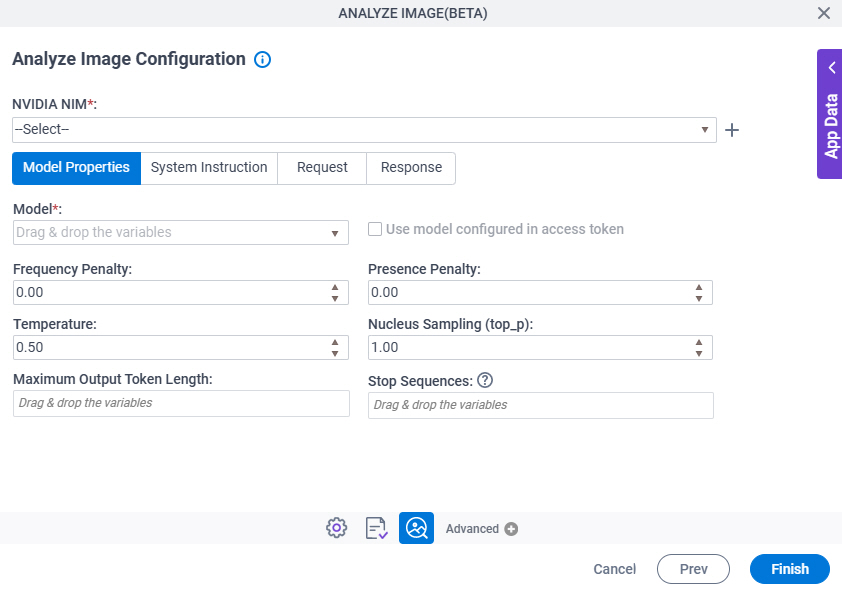
Figure 4. Analyze Image Configuration > Model Properties tab

Analyze Image Configuration Model Properties tab

Fields

Field NameDefinition

NVIDIA NIM

Description:
Specifies the access token that connects to NVIDIA NIM.
Allowed Values:
A list of access tokens configured for your environment.
Default Value:
None

Create Add Token icon

Opens this Screen:
Access Token for NVIDIA NIM
Function of this Screen:
Configure an access token to connect to NVIDIA NIM.

Model

Description:
Specifies the name of the model to use to generate text output.
Allowed Values:
A model name from the list.

When you select the access token from the access token field, this field shows the model names associated with the access token.

If the specified access token is configured with the model and the Use Model Configured In Access Token field is selected, this field shows the model name configured with the access token, and you can not change it.

Default Value:
None
Accepts Variables:
Yes
Limitations:

Some information about third-party integrations is outside the scope of the AgilePoint NX Product Documentation. It is the responsibility of the vendors who create and maintain these technologies to provide this information. This includes specific business use cases and examples; explanations for third-party concepts; details about the data models and input and output data formats for third-party technologies; and various types of IDs, URL patterns, connection string formats, or other technical information that is specific to the third-party technologies. For more information, refer to Where Can I Find Information and Examples for Third-Party Integrations?

Use Model Configured In Access Token

Description:
Specifies whether to use the model configured in the selected access token.
Allowed Values:
  • Selected - Uses the model configured in the access token.

    When you select the access token from the access token field, this field is enabled.

  • Deselected - Configures the model to use to generate text output.
Default Value:
Deselected
Limitations:

Some information about third-party integrations is outside the scope of the AgilePoint NX Product Documentation. It is the responsibility of the vendors who create and maintain these technologies to provide this information. This includes specific business use cases and examples; explanations for third-party concepts; details about the data models and input and output data formats for third-party technologies; and various types of IDs, URL patterns, connection string formats, or other technical information that is specific to the third-party technologies. For more information, refer to Where Can I Find Information and Examples for Third-Party Integrations?

Frequency Penalty

Description:
Specifies the frequency penalty for the LLM to use the same words or phrases in generated text output.

A high value means the model uses the same words or phrases less frequently.

A low value means the model uses the same words or phrases more frequently.

Allowed Values:
A decimal number.

Range:

  • -2.00 - 2.00
Default Value:
None
Limitations:

Some information about third-party integrations is outside the scope of the AgilePoint NX Product Documentation. It is the responsibility of the vendors who create and maintain these technologies to provide this information. This includes specific business use cases and examples; explanations for third-party concepts; details about the data models and input and output data formats for third-party technologies; and various types of IDs, URL patterns, connection string formats, or other technical information that is specific to the third-party technologies. For more information, refer to Where Can I Find Information and Examples for Third-Party Integrations?

Presence Penalty

Description:
Specifies the presence penalty for the LLM model to use the same word frequently in generated text output.

A high value means the model uses the same word less frequently.

A low value means the model uses the same word more frequently.

Allowed Values:
A decimal number.

Range:

  • -2.00 - 2.00
Default Value:
None
Limitations:

Some information about third-party integrations is outside the scope of the AgilePoint NX Product Documentation. It is the responsibility of the vendors who create and maintain these technologies to provide this information. This includes specific business use cases and examples; explanations for third-party concepts; details about the data models and input and output data formats for third-party technologies; and various types of IDs, URL patterns, connection string formats, or other technical information that is specific to the third-party technologies. For more information, refer to Where Can I Find Information and Examples for Third-Party Integrations?

Maximum Token Length

Description:
Specifies the maximum number of tokens that can be used to generate text output.

This value limits the length of the generated text output.

Allowed Values:
An integer.

Range:

  • 1-10000
Default Value:
None
Limitations:

Some information about third-party integrations is outside the scope of the AgilePoint NX Product Documentation. It is the responsibility of the vendors who create and maintain these technologies to provide this information. This includes specific business use cases and examples; explanations for third-party concepts; details about the data models and input and output data formats for third-party technologies; and various types of IDs, URL patterns, connection string formats, or other technical information that is specific to the third-party technologies. For more information, refer to Where Can I Find Information and Examples for Third-Party Integrations?

Stop Sequences

Description:
Specifies one or more stop sequences to make the LLM stop creating text.

The model stops creating text when it finds the specified stop sequence.

Allowed Values:
A maximum of 4 stop sequences, separated by semicolons (;).

Stop sequences are specific words, phrases, or special characters other than semicolons (;).

Default Value:
None
Accepts Variables:
Yes
Example:
  • Thank you;Best regards;I hope this helps
  • For list items, if the stop sequence value is 11, the model generates stops generating list items after 10 items.
  • If the stop sequence is a period (.), the model stops generating text at the end of a sentence.

Temperature

Description:
Specifies the temperature value for the model to control the randomness of text output.
Allowed Values:
A decimal number.

Range:

  • 0.00 - 2.00
Default Value:
None
Limitations:

Some information about third-party integrations is outside the scope of the AgilePoint NX Product Documentation. It is the responsibility of the vendors who create and maintain these technologies to provide this information. This includes specific business use cases and examples; explanations for third-party concepts; details about the data models and input and output data formats for third-party technologies; and various types of IDs, URL patterns, connection string formats, or other technical information that is specific to the third-party technologies. For more information, refer to Where Can I Find Information and Examples for Third-Party Integrations?

Nucleus Sampling (top_p)

Description:
Specifies a top_p threshold value to control the randomness and predictability of text generation. This value limits the selection of possible tokens to the top_p percentage of cumulative probability.
Allowed Values:
A decimal number.

Range:

  • 0.00 - 2.00
Default Value:
None
Limitations:

Some information about third-party integrations is outside the scope of the AgilePoint NX Product Documentation. It is the responsibility of the vendors who create and maintain these technologies to provide this information. This includes specific business use cases and examples; explanations for third-party concepts; details about the data models and input and output data formats for third-party technologies; and various types of IDs, URL patterns, connection string formats, or other technical information that is specific to the third-party technologies. For more information, refer to Where Can I Find Information and Examples for Third-Party Integrations?

Analyze Image Configuration > System Instruction tab

Configures the system instruction that is used to guide the LLM to generate text output.
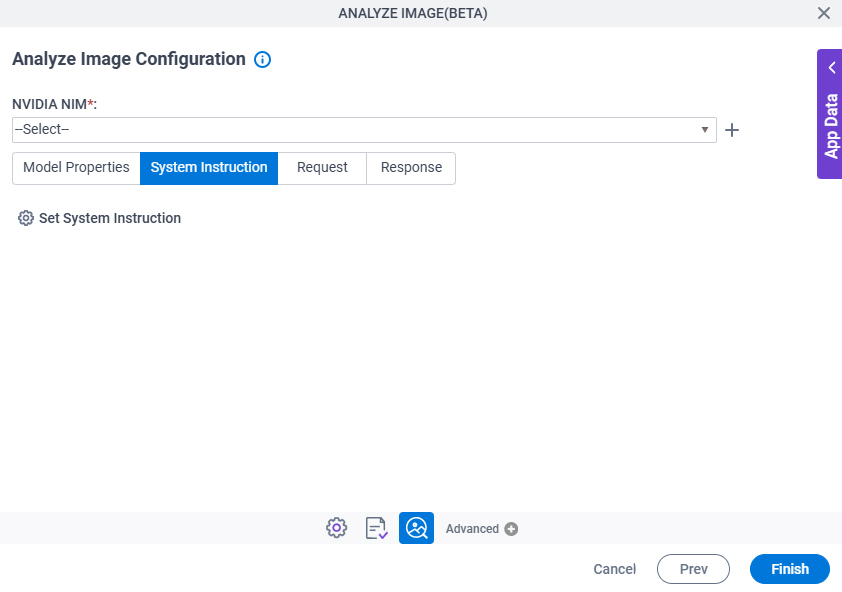
Figure 5. Analyze Image Configuration > System Instruction tab

Analyze Image Configuration System Instruction tab

Fields

Field NameDefinition

NVIDIA NIM

Description:
Specifies the access token that connects to NVIDIA NIM.
Allowed Values:
A list of access tokens configured for your environment.
Default Value:
None

Create Add Token icon

Opens this Screen:
Access Token for NVIDIA NIM
Function of this Screen:
Configure an access token to connect to NVIDIA NIM.

Set System Instruction

Opens this Screen:
Analyze Image Configuration > NVIDIA NIM > System Instruction > Goals/Mission tab
Function of this Screen:
Specifies the goals or rules for the LLM to generate text output.

Analyze Image Configuration > System Instruction > Goals/Mission tab

Specifies the goals or rules for the LLM to generate text output.
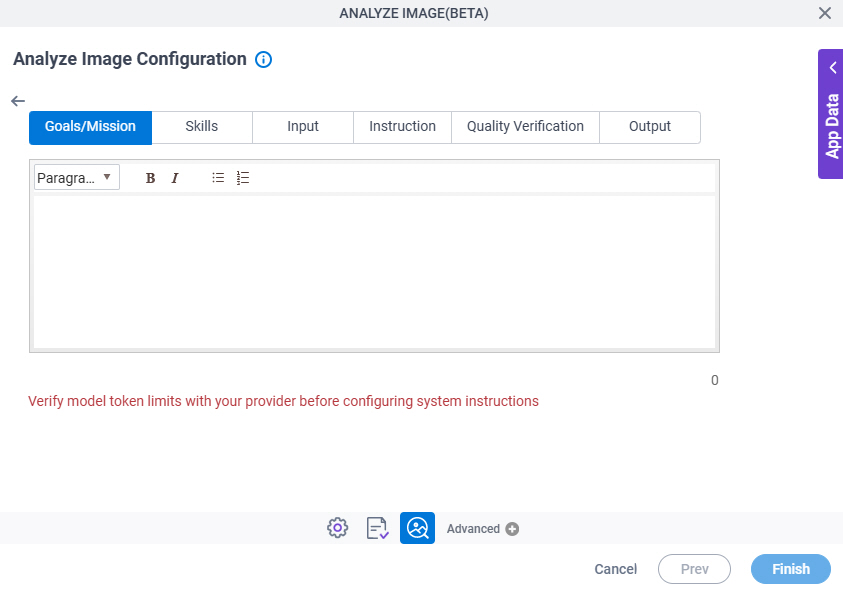
Figure 6. Analyze Image Configuration > System Instruction > Goals/Mission tab

Analyze Image Configuration System Instruction Goals Mission tab

Fields

Field NameDefinition

Goals / Mission

Description:
Specifies the goals or rules for the LLM to generate text output.
To Open this Field:
  1. On the System Instruction tab, click Set System Instruction.
Allowed Values:
More than one line of text.

Format:

  • Rich text
Default Value:
None
Limitations:

Some information about third-party integrations is outside the scope of the AgilePoint NX Product Documentation. It is the responsibility of the vendors who create and maintain these technologies to provide this information. This includes specific business use cases and examples; explanations for third-party concepts; details about the data models and input and output data formats for third-party technologies; and various types of IDs, URL patterns, connection string formats, or other technical information that is specific to the third-party technologies. For more information, refer to Where Can I Find Information and Examples for Third-Party Integrations?

Analyze Image Configuration > System Instruction > Skills tab

Specifies the skills or roles for the LLM used to generate text output.
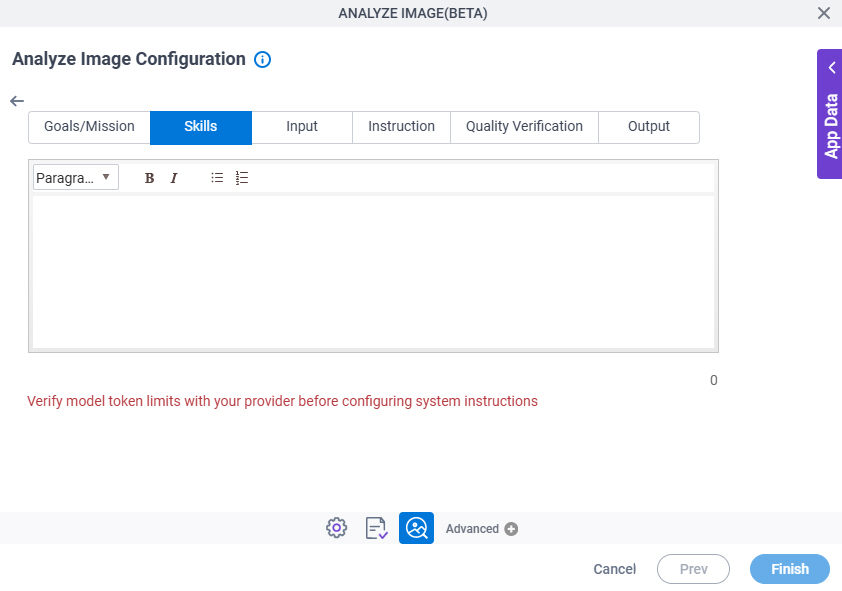
Figure 7. Analyze Image Configuration > System Instruction > Skills tab

Analyze Image Configuration System Instruction Skills tab

Fields

Field NameDefinition

Skills

Description:
Specifies the skills or roles for the LLM used to generate text output.
To Open this Field:
  1. On the System Instruction tab, click Set System Instruction.
Allowed Values:
More than one line of text.

Format:

  • Rich text
Default Value:
None
Limitations:

Some information about third-party integrations is outside the scope of the AgilePoint NX Product Documentation. It is the responsibility of the vendors who create and maintain these technologies to provide this information. This includes specific business use cases and examples; explanations for third-party concepts; details about the data models and input and output data formats for third-party technologies; and various types of IDs, URL patterns, connection string formats, or other technical information that is specific to the third-party technologies. For more information, refer to Where Can I Find Information and Examples for Third-Party Integrations?

Analyze Image Configuration > System Instruction > Input tab

Specifies the input content the LLM used to generate text output.
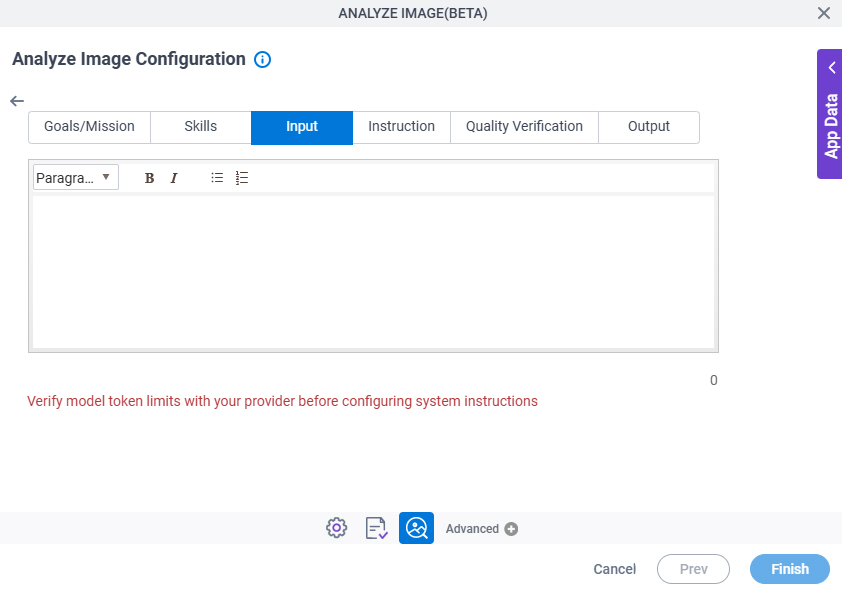
Figure 8. Analyze Image Configuration > System Instruction > Input tab

Analyze Image Configuration System Instruction Input tab

Fields

Field NameDefinition

Input

Description:
Specifies the input content the LLM used to generate text output.
To Open this Field:
  1. On the System Instruction tab, click Set System Instruction.
Allowed Values:
More than one line of text.

Format:

  • Rich text
Default Value:
None
Limitations:

Some information about third-party integrations is outside the scope of the AgilePoint NX Product Documentation. It is the responsibility of the vendors who create and maintain these technologies to provide this information. This includes specific business use cases and examples; explanations for third-party concepts; details about the data models and input and output data formats for third-party technologies; and various types of IDs, URL patterns, connection string formats, or other technical information that is specific to the third-party technologies. For more information, refer to Where Can I Find Information and Examples for Third-Party Integrations?

Analyze Image Configuration > System Instruction > Instruction tab

Specifies any guidance or information to refine the response of the model to generate text output.
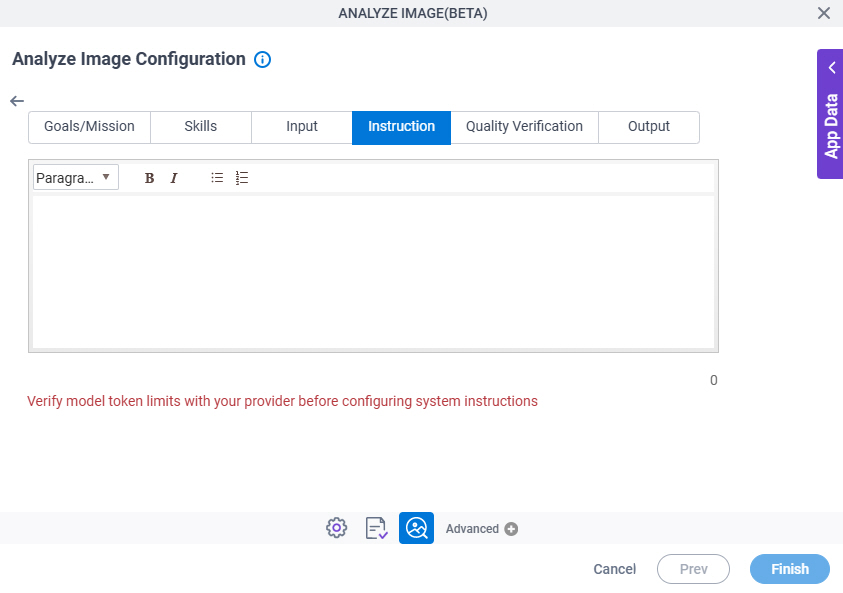
Figure 9. Analyze Image Configuration > System Instruction > Instruction tab

Analyze Image Configuration System Instruction Instruction tab

Fields

Field NameDefinition

Instruction

Description:
Specifies any guidance or information to refine the response of the model to generate text output.
To Open this Field:
  1. On the System Instruction tab, click Set System Instruction.
Allowed Values:
More than one line of text.

Format:

  • Rich text
Default Value:
None
Limitations:

Some information about third-party integrations is outside the scope of the AgilePoint NX Product Documentation. It is the responsibility of the vendors who create and maintain these technologies to provide this information. This includes specific business use cases and examples; explanations for third-party concepts; details about the data models and input and output data formats for third-party technologies; and various types of IDs, URL patterns, connection string formats, or other technical information that is specific to the third-party technologies. For more information, refer to Where Can I Find Information and Examples for Third-Party Integrations?

Analyze Image Configuration > System Instruction > Quality Verification tab

Specifies any guidance or information to verify the accuracy of the generated text output.
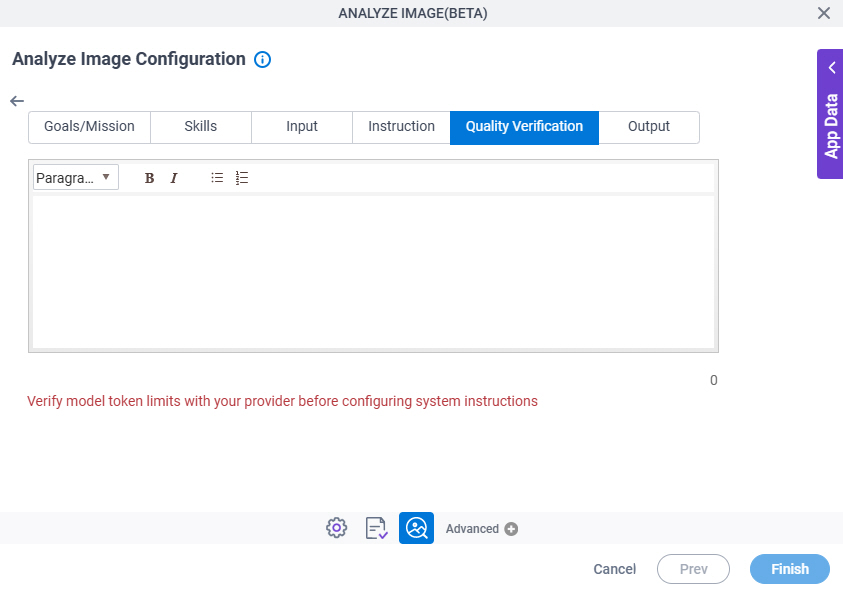
Figure 10. Analyze Image Configuration > System Instruction > Quality Verification tab

Analyze Image Configuration System Instruction Quality Verification tab

Fields

Field NameDefinition

Quality Verification

Description:
Specifies any guidance or information to verify the accuracy of the generated text output.
To Open this Field:
  1. On the System Instruction tab, click Set System Instruction.
Allowed Values:
More than one line of text.

Format:

  • Rich text
Default Value:
None
Limitations:

Some information about third-party integrations is outside the scope of the AgilePoint NX Product Documentation. It is the responsibility of the vendors who create and maintain these technologies to provide this information. This includes specific business use cases and examples; explanations for third-party concepts; details about the data models and input and output data formats for third-party technologies; and various types of IDs, URL patterns, connection string formats, or other technical information that is specific to the third-party technologies. For more information, refer to Where Can I Find Information and Examples for Third-Party Integrations?

Analyze Image Configuration > System Instruction > Output tab

Specifies the output format the LLM used to generate text output.
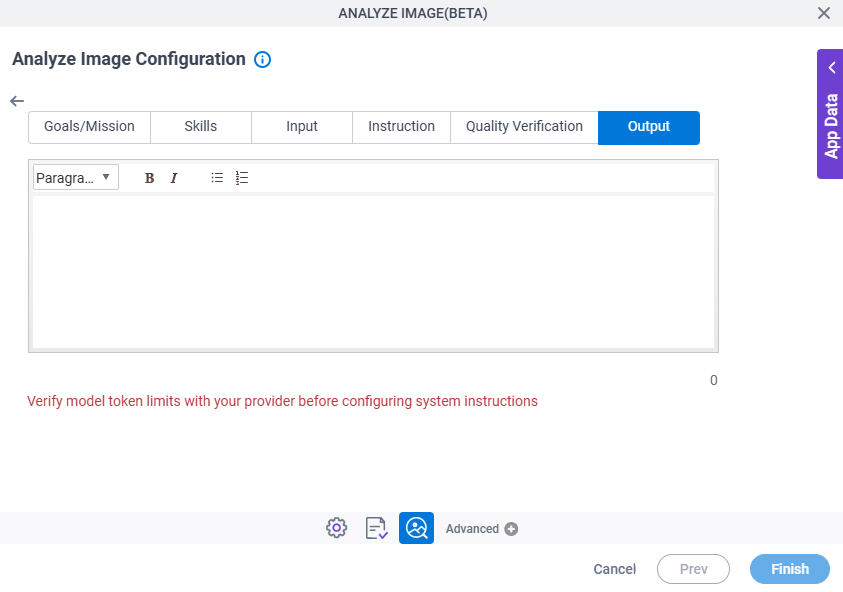
Figure 11. Analyze Image Configuration > System Instruction > Output tab

Analyze Image Configuration System Instruction Output tab

Fields

Field NameDefinition

Output

Description:
Specifies the output format the LLM used to generate text output.
To Open this Field:
  1. On the System Instruction tab, click Set System Instruction.
Allowed Values:
More than one line of text.

Format:

  • Rich text
Default Value:
None
Limitations:

Some information about third-party integrations is outside the scope of the AgilePoint NX Product Documentation. It is the responsibility of the vendors who create and maintain these technologies to provide this information. This includes specific business use cases and examples; explanations for third-party concepts; details about the data models and input and output data formats for third-party technologies; and various types of IDs, URL patterns, connection string formats, or other technical information that is specific to the third-party technologies. For more information, refer to Where Can I Find Information and Examples for Third-Party Integrations?

Analyze Image Configuration > Request tab

Specifies how to connect the request data from the LLM to the AgilePoint process schema.
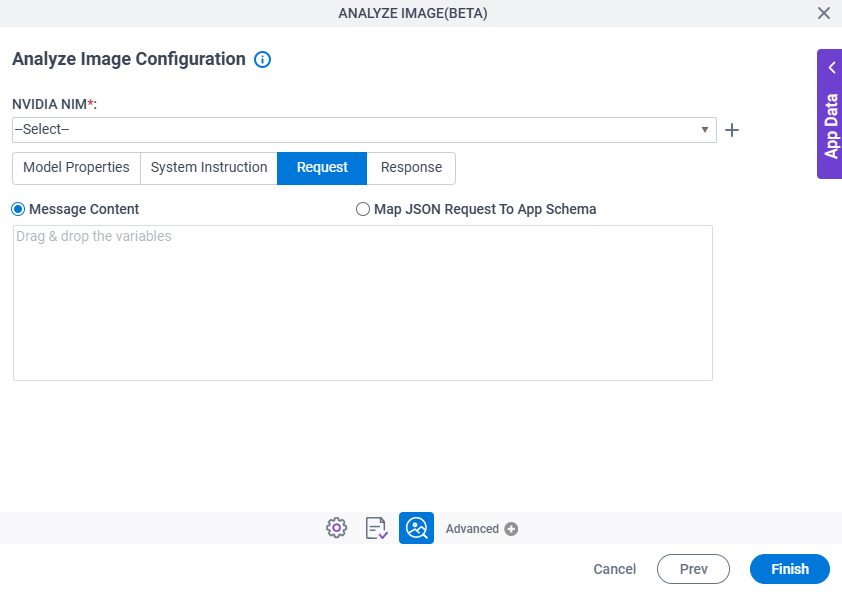
Figure 12. Analyze Image Configuration > Request tab

Analyze Image Configuration Request tab

Fields

Field NameDefinition

NVIDIA NIM

Description:
Specifies the access token that connects to NVIDIA NIM.
Allowed Values:
A list of access tokens configured for your environment.
Default Value:
None

Create Add Token icon

Opens this Screen:
Access Token for NVIDIA NIM
Function of this Screen:
Configure an access token to connect to NVIDIA NIM.

Message Content / Map JSON Request To App Schema

Description:
Specifies how to connect the request data from the LLM to the AgilePoint process schema.
Allowed Values:
  • Message Content – Specifies a text prompt that defines the content for the message.

    The LLM reads the text in this field to generate text output.

  • Map JSON Request To App Schema - Specifies a payload to use to connect to the AgilePoint process schema.

    The payload must be in JSON format.

    Click the Map Schema button to open the Schema Mapper.

    Use this screen to connect the payload values to the AgilePoint process schema.

Default Value:
Message Content
Accepts Variables:
Yes
Limitations:

Some information about third-party integrations is outside the scope of the AgilePoint NX Product Documentation. It is the responsibility of the vendors who create and maintain these technologies to provide this information. This includes specific business use cases and examples; explanations for third-party concepts; details about the data models and input and output data formats for third-party technologies; and various types of IDs, URL patterns, connection string formats, or other technical information that is specific to the third-party technologies. For more information, refer to Where Can I Find Information and Examples for Third-Party Integrations?

Analyze Image Configuration > Response tab

Specifies where to store the response from the LLM.
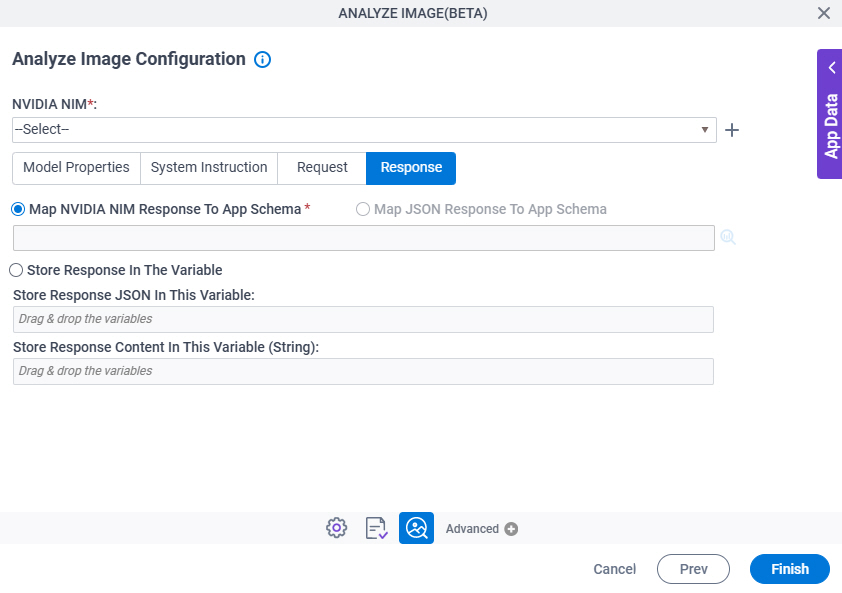
Figure 13. Analyze Image Configuration > Response tab

Analyze Image Configuration Response tab

Fields

Field NameDefinition

NVIDIA NIM

Description:
Specifies the access token that connects to NVIDIA NIM.
Allowed Values:
A list of access tokens configured for your environment.
Default Value:
None

Create Add Token icon

Opens this Screen:
Access Token for NVIDIA NIM
Function of this Screen:
Configure an access token to connect to NVIDIA NIM.

Map NVIDIA NIM Response To App Schema / Map JSON Response To App Schema

Description:
Specifies where to store the response from NVIDIA NIM.
Allowed Values:
  • Map NVIDIA NIM Response To App Schema – Select this option if you want to map the information from the NVIDIA NIM data model to your process schema.

    Click the Schema Mapping Schema Mapping icon button to open the Schema Mapper.

    Use this screen to connect the response to the data model for your process.

  • Map JSON Response To App Schema – Select this option if you want to map the information from the payload specified in the Output field on the System Instruction > Output tab to your process schema.

    The payload must be in JSON format.

    Click Map Response to open the Schema Mapper.

    Use this screen to connect the response to the data model for your process.

Default Value:
Map NVIDIA NIM Response To App Schema
Accepts Variables:
No
Limitations:
  • On the System Instruction > Output tab, if you enter the payload in the Output field,, the Map JSON Response To App Schema option is enabled.
  • Some information about third-party integrations is outside the scope of the AgilePoint NX Product Documentation. It is the responsibility of the vendors who create and maintain these technologies to provide this information. This includes specific business use cases and examples; explanations for third-party concepts; details about the data models and input and output data formats for third-party technologies; and various types of IDs, URL patterns, connection string formats, or other technical information that is specific to the third-party technologies. For more information, refer to Where Can I Find Information and Examples for Third-Party Integrations?

Store Response JSON In This Variable

Description:
Specifies a variable to store the information from the LLM.

In the text field, specify a variable that accepts an alphanumeric string in JSON format.

Allowed Values:
A variable.

Format:

  • String

Accepted:

  • Letters
  • Numbers
  • Spaces
  • Special characters
Default Value:
None
Accepts Variables:
Yes
Limitations:

Some information about third-party integrations is outside the scope of the AgilePoint NX Product Documentation. It is the responsibility of the vendors who create and maintain these technologies to provide this information. This includes specific business use cases and examples; explanations for third-party concepts; details about the data models and input and output data formats for third-party technologies; and various types of IDs, URL patterns, connection string formats, or other technical information that is specific to the third-party technologies. For more information, refer to Where Can I Find Information and Examples for Third-Party Integrations?

Store Response Content In This Variable (String)

Description:
Specifies a variable to store the content of the text output from the LLM.
Allowed Values:
A variable.

Format:

  • String

Accepted:

  • Letters
  • Numbers
  • Spaces
  • Special characters
Default Value:
None
Limitations:

Some information about third-party integrations is outside the scope of the AgilePoint NX Product Documentation. It is the responsibility of the vendors who create and maintain these technologies to provide this information. This includes specific business use cases and examples; explanations for third-party concepts; details about the data models and input and output data formats for third-party technologies; and various types of IDs, URL patterns, connection string formats, or other technical information that is specific to the third-party technologies. For more information, refer to Where Can I Find Information and Examples for Third-Party Integrations?