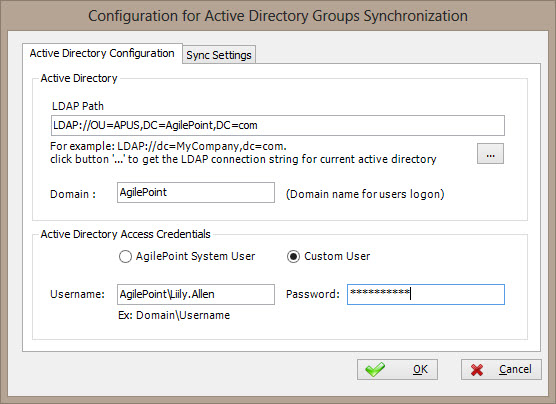
Synchronizes AgilePoint Server user data with Active Directory.
How to Start
- On the AgilePoint Server machine, click
Start > All Programs >
AgilePoint > AgilePoint Configuration.
- On the
AgilePoint Server Configuration Tool
screen, click the Extensions tab.
- On the Extensions tab, select ADSyncModule.dll.
- Click Configure.
- On the Configuration for Active Directory Groups Synchronization window, click the Active Directory Configuration tab.
Fields
| Field Name |
Definition |
LDAP Path
|
- Definition:
- Specifies the LDAP connection string for your Active Directory.
- Allowed Values:
-
A valid LDAP connection string.
Use the Ellipses button to retrieve the connection string for
the current Active Directory.
- Default Value:
- LDAP://
- Example:
- LDAP://DC=MyCompany,dc=com
|
Domain
|
- Definition:
- The authentication domain for Active Directory users.
- Allowed Values:
- A valid domain.
- Default Value:
- None
|
Configure
|
- Opens the Following Window:
- Advanced LDAP Settings Window
- To Access This Field:
- You must be using a Multi-Tenant environment.
- Purpose of this Window:
- Specifies to map the LDAP connection string for your Active Directory with your tenant.
|
AgilePoint System User
|
- Definition:
- Specifies whether the ADSync module extension connects to the
specified Active Directory using the AgilePoint Service
Account (or system account).
- Allowed Values:
-
- Selected - The ADSync module uses the AgilePoint
Service Account.
- Deselected - The ADSync module uses a custom account.
- Default Value:
- Selected
|
Custom Account
|
- Definition:
- Specifies whether the ADSync module extension connects to the
specified Active Directory using a specified account other than
the AgilePoint Service Account. This is
useful if the AgilePoint Service Account does not have an account
on your Active Directory domain.
- Allowed Values:
-
- Selected - The ADSync module uses a custom account.
- Deselected - The ADSync module uses the AgilePoint
Service Account.
- Default Value:
- Deselected
|
Username
|
- Definition:
- Specifies the user name for
an account you want AgilePoint Server to use to connect to
your Active Directory domain.
- Allowed Values:
- A valid user name for an account that
has access to the Active Directory domain to which you want to connect.
- Example:
- DEMO3/jsmith
|
Password
|
- Definition:
- The password for the authentication account.
- Allowed Values:
- A valid password.
- Default Value:
- None
|
Sync Settings Tab
|
- Opens the Following Window:
- Configuration for Active Directory Groups Synchronization Window - Sync Settings Tab
- Purpose of this Window:
- Specifies the how often Active Directory users and groups are synchronized.
|