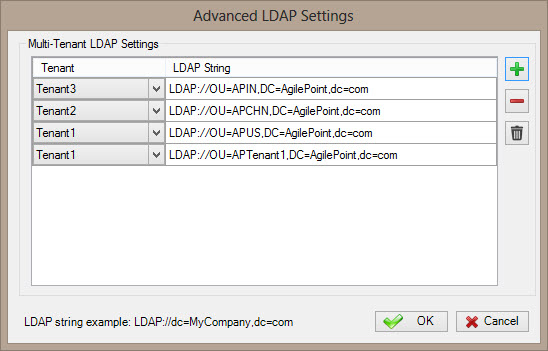
Specifies to map the LDAP connection string for your Active Directory with your tenant.
Prerequisites
- To access this window, you must have a multi-tenant environment.
How to Start
- On the AgilePoint Server machine, click
Start > All Programs >
AgilePoint > AgilePoint Configuration.
- On the
AgilePoint Server Configuration Tool
screen, click the Extensions tab.
- On the Extensions tab, select ADSyncModule.dll.
- Click Configure.
- On the Configuration for Active Directory Groups Synchronization window, click Configure.
Fields
| Field Name |
Definition |
Add (+)
|
- Action:
- Creates a row where you can specify your tenant name and LDAP string.
|
Tenant
|
- Definition:
- Specifies the name of the tenant for which you want to map with LDAP connection string.
You can have multiple instances of the same tenant name, and
each tenant can have multiple LDAP connection strings.
- Allowed Values:
- A list of your enabled tenant names.
- Default Value:
- None
|
LDAP String
|
- Definition:
- Specifies the LDAP connection string of your Active Directory for your tenant.
- Allowed Values:
- A valid LDAP connection string.
- Default Value:
- None
- Example:
- LDAP://DC=MyCompany,dc=com
|
Remove (-)
|
- Action:
- Deletes the selected row from the multi-tenant LDAP settings list.
|
Delete ( )
|
- Action:
- Deletes all rows from the multi-tenant LDAP settings list.
|
