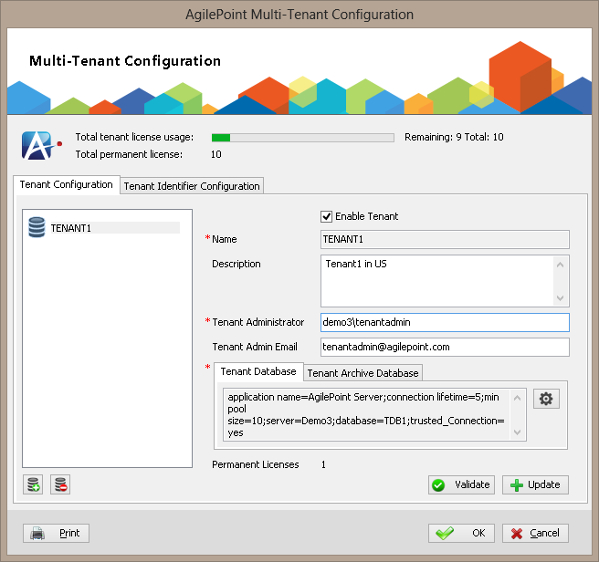
Specifies the setup for tenants, or database instances to associate
with your
AgilePoint Server.
How to Start
- On the AgilePoint Server machine, click
Start > All Programs >
AgilePoint > AgilePoint Configuration.
- On the AgilePoint Server Configuration Tool window, click
Multi-Tenant Configuration.
- On the Mult-Tenant Configuration window, click the Tenant Configuration tab.
Fields
| Field Name |
Definition |
Enable Tenant
|
- Definition:
- Specifies whether to enable the selected tenant.
- Allowed Values:
-
- Selected - Activates the selected tenant.
- Deselected - Deactivates the selected tenant.
- Default Value:
- Selected
|
Name
|
- Definition:
- Specifies unique name of tenant.
- Allowed Values:
- A single line of text.
- Default Value:
- None
|
| Description |
- Definition:
- Specifies a free text description of the tenant.
- Allowed Values:
- Multiple lines of text.
- Default Value:
- None
|
Tenant Administrator
|
- Definition:
- Specifies the user name for the tenant administrator.
- Allowed Values:
- A valid user name in the format [domain]\[user name].
- Default Value:
- None
- Example:
- demo3\tenantadmin.
|
Tenant Admin Email
|
- Definition:
- The tenant administrator's email address to which notification to be send.
- Allowed Values:
- A valid email address.
- Default Value:
- None
|
Tenant Database Tab
|
- Action:
- Specifies the connection to the database to store workflow
data for your tenant.
|
Tenant Archive Database Tab
|
- Action:
- Specifies the connection to the archive database for your tenant,
where AgilePoint
stores backup of the workflow data and archived process data.
|
Configure ( ) )
|
- Opens the Following Window:
- Connection String Builder Window
- Purpose of this Window:
- Sets up a connection string to a workflow
database or archive database for your tenant.
|
Add ( ) )
|
- Action:
- Adds new tenant.
|
Remove ( ) )
|
- Action:
- Deletes the selected tenant from the tenant list.
|
Validate
|
- Action:
- Validates the selected database connection string.
|
Update
|
- Action:
- Saves your tenant settings.
|
Print
|
- Action:
- Displays the AgilePoint multi-tenant license information and tenant information.
|
Tenant Identifier Configuration Tab
|
- Opens the Following Window:
- AgilePoint Multi-Tenant Configuration Window - Tenant Identifier Configuration Tab
- Purpose of this Window:
- Sets the Tenant Identifier assembly to determine which tenant the
user belongs to based on a user name, e-mail address, or mobile number stored in the
AgilePoint database.
|