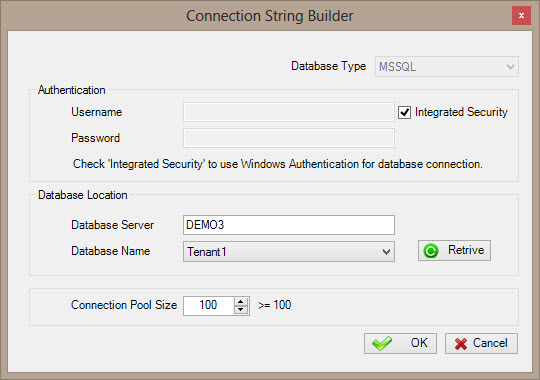
Sets up a connection string to a workflow
database or archive database for your tenant.
How to Start
- On the AgilePoint Server machine, click
Start > All Programs >
AgilePoint > AgilePoint Configuration.
- On the AgilePoint Server Configuration Tool window, click
Multi-Tenant Configuration.
- On the Mult-Tenant Configuration window, click the Tenant Configuration tab.
- Click the Tenant Database\Tenant Archive Database tab.
Fields
| Field Name |
Definition |
Database Type
|
- Definition:
- Specifies the database technology you are using
to store AgilePoint data.
- Allowed Values:
- Read only
|
Username
|
- Definition:
- The user name for the database account AgilePoint Server uses
to connect to the database.
- Allowed Values:
- A valid user name for the database.
- Default Value:
- None
|
Password
|
- Definition:
- The password for the authentication account.
- Allowed Values:
- A valid password.
- Default Value:
- None
|
Integrated Security
|
- Definition:
- When integrated security is selected, the current windows account credentials are used for authentication.
- Allowed Values:
- Selected - The windows account credentials are used for authentication automatically.
- Deselected - The user and password fields are enabled for database authentication.
- Default Value:
- Selected
|
Database Server
|
- Definition:
- Specifies the server name and domain for your database.
- Allowed Values:
- A valid database server name.
- Default Value:
- None
|
Database Name
|
- Definition:
- Specifies the name of your database.
- Allowed Values:
- A valid database name.
- Default Value:
- None
|
Retrieve
|
- Action:
- Retrieves the names of existing databases from the data source.
|
Connection Pool Size
|
- Definition:
- Specifies the maximum number of database connections that use to connect to the workflow database at runtime.
- Allowed Values:
- Any integer.
It is recommended to use a connection pool size that is >= 100 or 2 * the thread pool size.
- Default Value:
- 100
|