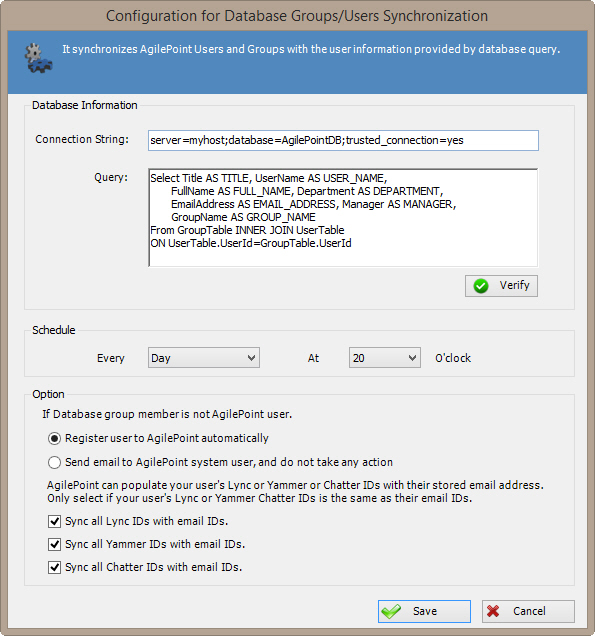
Synchronizes AgilePoint Users and Groups
with the user information resulting from a database query.
How to Start
- On the AgilePoint Server machine, click
Start > All Programs >
AgilePoint > AgilePoint Configuration.
- On the
AgilePoint Server Configuration Tool
screen, click the Extensions tab.
- On the Extensions tab, select DBSyncModule.
- Click Configure.
Fields
| Field Name |
Definition |
Configure
|
- Opens the Following Window:
- Database Configuration Window
- To Access This Field:
- You must be using a Multi-Tenant environment.
- Purpose of this Window:
- Synchronizes
users and groups for a tenant with the user information resulting from a database query.
|
Connection String
|
- Definition:
- Specifies the connection string to be used to connect to the database.
- Allowed Values:
- A valid connection string.
- Default Value:
- server=localhost;database=pubs;trusted_Connection=yes
- Custom Attributes:
- Yes
- Example:
- server=DataServer;database=StoreDb;trusted_Connection=yes
|
| Query |
- Definition:
The SQL query used to fetch the records from the database.
- Allowed Values:
A valid SQL query.
The query must fetch the following fields, which are mandatory:
- TITLE
- USER_NAME
- FULL_NAME
- DEPARTMENT
- EMAIL_ADDRESS
- MANAGER
- GROUP_NAME
|
Verify
|
- Action:
- Verifies whether the specified query and connection string are valid.
|
Schedule
|
- Action:
The frequency for database synchronization. Synchronization
can occur every day, week, or month, at a particular time or day.
|
If Active Directory group member is not AgilePoint user
|
- Definition:
- Specifies what actions to take if a member of
your Active Directory is not a registered
AgilePoint user.
- Allowed Values:
-
- Register user to AgilePoint automatically - Creates an AgilePoint
account for the user using their Active Directory information.
- Send email to AgilePoint system user, and do not
take any action - Does not create an AgilePoint account for
the Active Directory user, but sends a notification email
to the AgilePoint system user account.
- Default Value:
- Register user to AgilePoint automatically
|
Sync all Lync IDs with email IDs
|
- Definition:
- Synchronizes all of your users' Lync IDs with their email IDs.
This synchronization occurs each time and Active Directory
synchronization occurs. AgilePoint recommends using this option only if all of
your users' messaging IDs and email IDs are the same.
- Allowed Values:
-
- Selected - Synchronizes Lync IDs with
users' email IDs.
- Deselected - Does not synchronize Lync IDs with
users' email IDs.
- Default Value:
- Deselected
|
Sync all Yammer IDs with email IDs
|
- Definition:
- Synchronizes Yammer IDs with AgilePoint users' email IDs.
This synchronization occurs each time and Active Directory
synchronization occurs. AgilePoint recommends using this option only if all of
your users' messaging IDs and email IDs are the same.
- Allowed Values:
-
- Selected - Synchronizes Yammer IDs with
users' email IDs.
- Deselected - Does not synchronize Yammer IDs with
users' email IDs.
- Default Value:
- Deselected
|
Sync all Chatter IDs with email IDs
|
- Definition:
- Synchronizes Chatter IDs with AgilePoint users' email IDs.
This synchronization occurs each time and Active Directory
synchronization occurs. AgilePoint recommends using this option only if all of
your users' messaging IDs and email IDs are the same.
- Allowed Values:
-
- Selected - Synchronizes Chatter IDs with
users' email IDs.
- Deselected - Does not synchronize Chatter IDs with
users' email IDs.
- Default Value:
- Deselected
|