Database Configuration Window

Synchronizes users and groups for a tenant with the user information resulting from a database query.
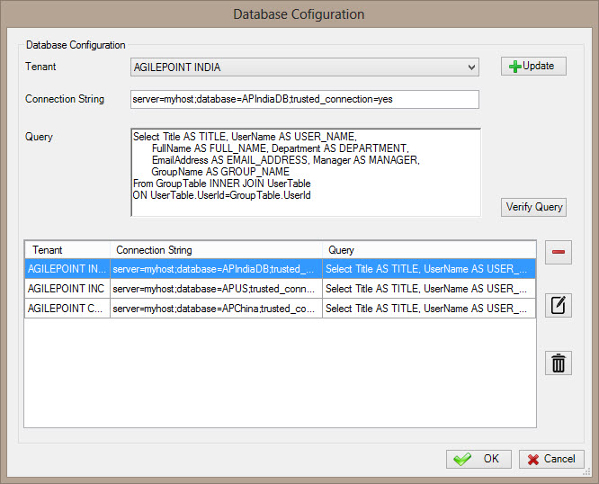


Prerequisites

  • To access this window, you must have a multi-tenant environment.

How to Start

  1. On the AgilePoint Server machine, click Start > All Programs > AgilePoint > AgilePoint Configuration.
  2. On the AgilePoint Server Configuration Tool screen, click the Extensions tab.
  3. On the Extensions tab, select DBSyncModule.
  4. Click Configure.
  5. On the Configuration for Database Groups/Users Synchronization window, in the Multi-Tenant Database Information section, click Configure.

Fields

Field Name Definition

Tenant

Definition:
Specifies the tenant name.
Allowed Values:
List of your enabled tenant names.
Default Value:
None

Connection String

Definition:
Specifies the connection string to be used to connect to the database.
Allowed Values:
A valid connection string.
Default Value:
server=localhost;database=pubs;trusted_Connection=yes
Custom Attributes:
Yes
Example:
server=DataServer;database=StoreDb;trusted_Connection=yes
Query
Definition:

The SQL query used to fetch the records from the database.

Allowed Values:

A valid SQL query.

The query must fetch the following fields, which are mandatory:
  • TITLE
  • USER_NAME
  • FULL_NAME
  • DEPARTMENT
  • EMAIL_ADDRESS
  • MANAGER
  • GROUP_NAME

Add

Action:
Creates a row where you can specify your tenant name, connection string and query.

Verify

Action:
Verifies whether the specified query and connection string are valid.

Update

Action:
Updates the selected row from the database configuration list.

Remove (-)

Action:
Deletes the selected row from the database configuration list.

Edit ()

Action:
Modifies the selected row from the database configuration list.

Delete ()

Action:
Deletes all rows from the database configuration list.
