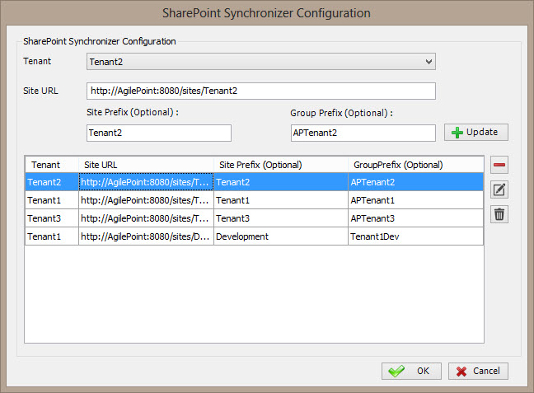
Specifies how to synchronize SharePoint groups with AgilePoint
groups within a tenant.
Prerequisites
- To access this window, you must have a multi-tenant environment.
How to Start
- On the AgilePoint Server machine, click
Start > All Programs >
AgilePoint > AgilePoint Configuration.
- On the
AgilePoint Server Configuration Tool
screen, click the Extensions tab.
- On the Extensions tab, select SPSyncModule.
- Click Configure.
- On the SharePoint Groups Synchronization window, click Configure.
Fields
| Field Name |
Definition |
Tenant
|
- Definition:
- Specifies the tenant name.
- Allowed Values:
- List of your enabled tenant names.
- Default Value:
- None
|
Site URL
|
- Definition:
- Specifies the URL for your SharePoint site.
- Allowed Values:
- A valid SharePoint site URL.
- Default Value:
- None
- Custom Attributes:
- Yes
- Example:
- http://mysharepoint:8000/sites/${mysite}
|
| Site Prefix |
- Action:
-
Distinguishes a site with the specified name prefix
in two site collections
during the synchronization process.
- Allowed Values:
A single line of text with no spaces.
- Default Value:
- None
- Example:
- Two sites, Site A and Site B, each have a group called "Employees."
In AgilePoint, you can create two groups:
"SiteA_Employees" and "SiteB_Employees."
While configuring site A, enter "SiteA_" in the Site Prefix so this
site syncs with "SiteA_Employees." While configuring Site B,
enter "SiteB_" in Site Prefix
so this site syncs with "SiteB_Employees".
|
| Group Prefix |
- Action:
-
Indicates that all the groups in SharePoint starting with
a specified prefix in the group name are
created in AgilePoint during the synchronization process.
- Allowed Values:
A single line of text with no spaces.
- Default Value:
- None
- Example:
If the group prefix value is set as GR_ then all
the new groups in SharePoint starting with GR_ will be
created and synced during the synchronization process.
|
Add
|
- Action:
- Creates a row where you can specify your tenant name, site url, site prefix and group prefix.
|
Update
|
- Action:
- Updates the selected row from the SharePoint groups synchronization configuration list.
|
Remove (-)
|
- Action:
- Deletes the selected row from the SharePoint groups synchronization configuration list.
|
Edit ( ) )
|
- Action:
- Modifies the selected row from the SharePoint groups synchronization configuration list.
|
Delete ( ) )
|
- Action:
- Deletes all rows from the SharePoint groups synchronization configuration list.
|