Global Extended Module Window

Specifies the authentication scheme for your REST endpoint.
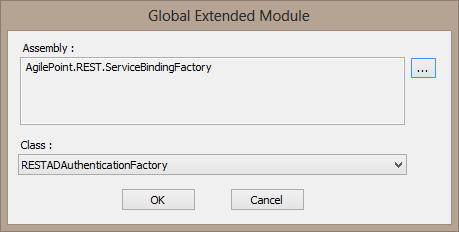
How to Start

  1. On the AgilePoint Server machine, click Start > All Programs > AgilePoint > AgilePoint Server Manager.
  2. On the AgilePoint Server Manager window, select your AgilePoint service.
  3. Click the Rest Port Information tab.
  4. On the Rest Port Information tab, in the Service Factory Binding field, click Browse.

Fields

Field Name Definition

Assembly

Definition:
Specifies the .dll file that provides server side authentication for REST services. In some circumstances you must create a custom authentication module.

For more information, refer to Server Side Authentication Using WCF Endpoints for AgilePoint Server.

Allowed Values:
A valid assembly name.
Default Value:
None.

The default .dll is [AgilePoint Server installation folder]\bin\AgilePoint.REST.ServiceBindingFactory.dll

Class Name

Definition:
Specifies the implementation of the IWFServiceBindingFactory interface.
Allowed Values:
A valid class name
Default Value:
None
