For process templates and AgileShapes that uses data from SharePoint,
the first time you access SharePoint during your AgilePoint Envision user
session, you must link it to a SharePoint list.
Procedure
- On the Connect to SharePoint dialog box,
complete the fields
to
specify the user account
you want to use to connect to SharePoint, and then
click OK.
These credentials will be
saved and used each time you open the process model.
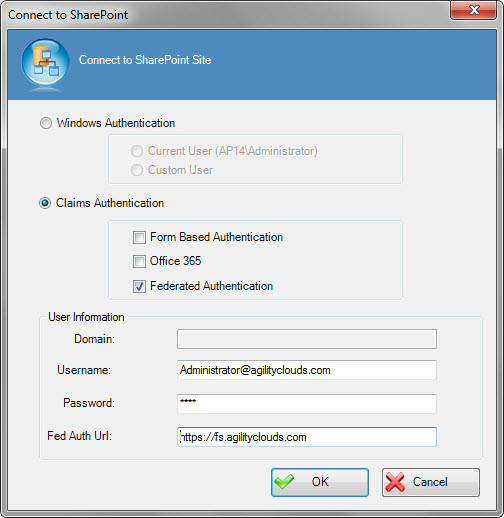
Fields
| Field Name |
Definition |
Windows Authentication
|
- Definition:
- Specifies if
AgilePoint uses Windows
Authentication to
connect to SharePoint.
|
| Claims Authentication |
- Definition:
- Specifies Claims authentication options for
SharePoint.
- Allowed Values:
- If this setting is selected, these types of Claims
Authentication are available:
- Form Based Authentication - Activates Forms based authentication
where a custom membership provider to connect to an on-premises SharePoint environment.
- Office 365 - Activates Claims authentication to connect
to SharePoint in an
Office 365 environment. You can use this setting side-by-side
with
on-premises SharePoint.
- Federated Authentication - Activates Federated
authentication to connect to SharePoint — for example, ADFS.
- Default Value:
- Deselected
|
Domain
|
- Definition:
- The authentication domain.
This does not apply to Form Based Authentication.
|
Username
|
- Definition:
- The user name for the SharePoint authentication account.
- Allowed Values:
- A valid user name.
- Default Value:
- None
- Custom Attributes:
- No
|
Password
|
- Definition:
- The password for the authentication account.
- Allowed Values:
- A valid password.
- Default Value:
- None
- Custom Attributes:
- Yes
|
Fed Auth Url
|
- Definition:
- The URI of the federated authentication provider. This
provider supplies security tokens for federated authentication.
- Allowed Values:
- A valid federated authentication provider URI.
- Default Value:
- None
- Custom Attributes:
- No
- Example:
- https://fs.agilityclouds.com
|
