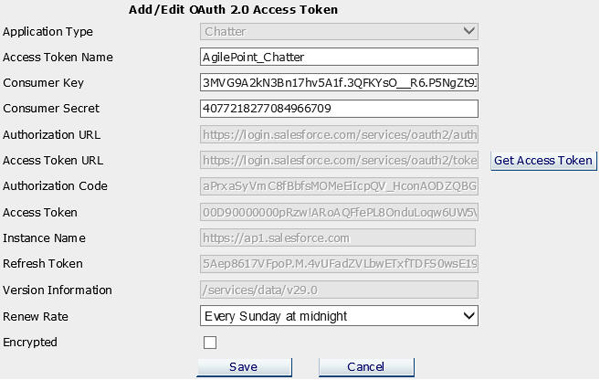
| Field Name |
Definition |
Application Type
|
- Definition:
- Specifies the third-party application, such as Yammer or Chatter.
- Allowed Values:
- A list of supported enterprise social applications.
- Default Value:
- Yammer
|
Access Token Name
|
- Definition:
- Specifies the unique
name for your connection to the enterprise social application.
- Allowed Values:
- An alphanumeric string that can include spaces.
- Default Value:
- None
|
Consumer Key
|
- Definition:
- Specifies the client ID of the app you created or added in
your third-party
application service, such as Yammer.
- Allowed Values:
- An alphanumeric string.
- Default Value:
- None
|
Consumer Secret
|
- Definition:
- Specifies your client secret of the app you created or added in
your third-party application service,
such as Yammer.
- Allowed Values:
- An alphanumeric string.
- Default Value:
- None
|
Authorization URL
|
- Definition:
- Specifies the standard authorization URL
exposed by the third-party application service to obtain your
authorization code.
- Allowed Values:
- A valid authorization URL.
Enterprise Manager completes this field
automatically for supported applications. Do not change the default value.
- Default Value:
- An required authorization URL for the social application.
|
Access Token URL
|
- Definition:
- Specifies the standard URL exposed by the third party application service
that is used to obtain an access token.
- Allowed Values:
- A valid URL.
Enterprise Manager completes this field
automatically for supported applications. Do not change the default value.
- Default Value:
- The standard URL to retrieve the access token from your social application.
|
Get Access Token
|
- Action:
- Sends a request to your third-party
application service to get the authorization code,
and then the access token.
To complete this process, you must log on to your third-party
application, and specify your consent when prompted.
|
Authorization Code
|
- Definition:
- Specifies the authorization code supplied by your
social application.
- Allowed Values:
- A valid authorization code.
This value is completed by your social application.
- Default Value:
- An unique authorization code.
|
Access Token
|
- Definition:
- Specifies an access token, or code, supplied
by your social application.
- Allowed Values:
- A valid token.
This value is completed by your social application.
- Default Value:
- An unique token.
|
Instance Name
|
- Definition:
- Specifies URL of the SalesForce account to which the current token connects.
This is the Misc field AgilePoint displays to identify the environment
this token is accessing.
This field applies to Chatter only.
For Yammer applications, the Misc field refers
to the Network Name field.
- Allowed Values:
- A valid network name.
This value is completed by your social application.
- Default Value:
- None.
|
Refresh Token
|
- Definition:
- Specifies an refresh token, or code, supplied
by your social application. This token provides long-term
authentication to some social applications. See the documentation
for your social application for details.
- Allowed Values:
- A valid token.
This value is completed by your social application.
- Default Value:
- An unique token.
|
Version Information
|
- Definition:
- Specifies the version information for your API. This field
applies only to Chatter applications.
- Allowed Values:
- Version information for your social network.
This value is completed by your social application.
- Default Value:
- None.
|
Renew Rate
|
- Definition:
- Specifies how frequently to renew your application's
access token.
- Allowed Values:
- Disabled
- Every 15 minutes
- Every half an hour
- Every hour
- Every 2 hours
- Every 4 hours
- Every 6 hours
- Every 8 hours
- Every half day
- Once a day at midnight
- Once a day at noon
- Every other day at midnight
- Every Sunday at midnight
- Default Value:
- Disabled
|
Encrypted
|
- Definition:
- Specifies whether to store the access token as
encrypted in the AgilePoint database.
- Allowed Values:
- Deselected - The access token is stored as plain text.
- Selected - The access token is stored as encrypted data.
- Default Value:
- Deselected
|
Save
|
- Action:
- Saves the token in your global application
settings.
|