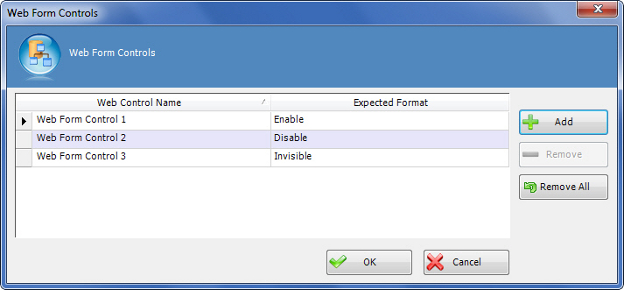
Web Form Controls Window

Sets up the display of custom web form.


How to Start

  1. In AgilePoint Envision, open a process template.
  2. Navigate to the Premier Extension stencil.
  3. On the Premier Extension stencil, drag the WebForm AgileShape, and drop it on the process template.
  4. To view the full list of properties, in the Design Tasks pane, click Show Properties.
  5. On the WebFormControls field, click the Ellipses button.

Fields

Field Name Definition

Add

Action:
Adds a row to specify a web form control name and how the control is displayed on the web form.

Web Control Name

Definition:
Specifies the custom controls to be used in the web form.
Allowed Values:
A text string that specifies the name of a web form control.
Default Value:
None
Custom Attributes:
No

Expected Format

Definition:
Determines the display and availability of custom controls on the web form, such as whether a web form control is visible and editable.
Allowed Values:
  • Enable - The control is visible and editable.
  • Disable - The control is visible, but not editable.
  • Invisible - The control is not visible.
Default Value:
None

Remove

Action:
Deletes the selected row from the Web Form Controls list.

Remove All

Action:
Deletes all rows from the Web Form Controls list.

Common Configuration Tasks