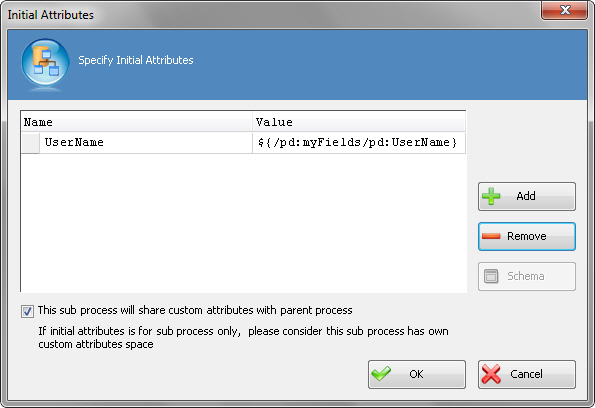
Specifies a set of the custom process attributes to pass to a subprocess at runtime.
You can share the parent process's variables with the subprocess if the subprocess uses the same data.
The subprocess can have its own data only within the subprocess, or it can share its data with the parent process. For example, a subprocess can access the data of the parent process, such as the reviewer name and review completion date.
How to Start
- In AgilePoint Envision, open a process template.
- Open the Generic BPM stencil.
- On the Generic BPM stencil, drag the
SubProcess AgileShape, and drop it on the process template.
- To view the full list of properties, in the Design Tasks pane, click Show Properties.
- On the Initial Attributes field, click the Ellipses button.
Fields
| Field Name |
Definition |
Name
|
- Definition:
- The name of a variable you want to associate with the sub process.
- Allowed Values:
- A text string with no spaces.
- Default Value:
- None
|
Value
|
- Definition:
- The value in the child process to associate with the variable
in the parent process.
- Allowed Values:
- XML metadata defined for the sub process.
- Default Value:
- System.String - Indicates that AgilePoint system accepts the values as String data
type only. In itself, this is not a valid value.
- Custom Attributes:
- Yes
|
This sub process will share custom attributes with parent process
|
- Definition:
- Allows the sub process to share custom attributes with the parent process.
- Allowed Values:
- Selected - The sub process shares custom attributes with the
parent process.
- Deselected - Only the sub process uses custom attributes.
If you are using a parent and sub process that use different form types —
for example, an AgileForms parent process with a SharePoint ListForm sub
process — the processes cannot share custom attributes because the schemas
are different. You must deselect this option, and map the custom attributes in
this window.
- Default Value:
- Selected
|
Common Configuration Tasks