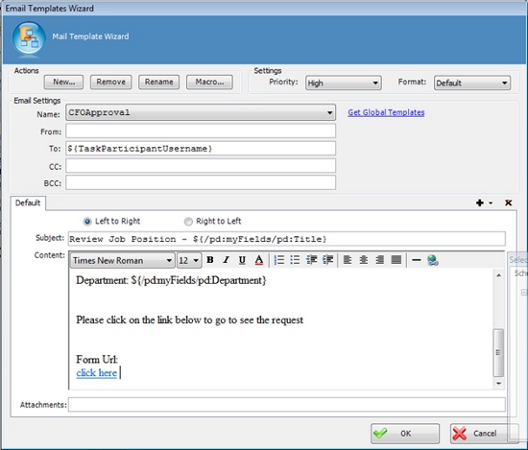
Specifies the content of an email template. An email template determines recipients,
subject, body, and other aspects of an automated email template sent from AgilePoint.
How to Start
- In AgilePoint Envision, open a process template.
- Drag any AgileWork, and drop it on the Process Model.
- To view the full list of properties, in the Design Tasks pane, click Show Properties.
- In one of the following fields, click Add Mail Template.
The specific fields that display vary, depending upon the AgileShape
you are using:
- Activity Entry Message (Email)
- Reminder Message (Email)
- Task Completed Message (Email)
- Task Reassigned Message (Email)
- On the Email Template Wizard, do one of the following:
- To modify an existing message template, in the
Name list, select the name of the template you want to modify.
- To create a new message template:
- Click New.
- On the New Name window, enter the name you want to identify your message
template.
- Click OK.
Fields
| Field Name |
Definition |
New
|
- Action:
- Opens the New Name window, where you can enter
the name of the message template.
- Allowed Values:
- Free text in text format.
- Default Value:
- None
- Custom Attributes:
- No
|
Rename
|
- Action:
- Opens the New Name window, where you can change the name of the message template.
- Allowed Values:
- A single line of text.
- Default Value:
- None
- Custom Attributes:
- No
|
Remove
|
- Action:
- Deletes the message template from the Name list.
|
Name
|
- Definition:
- Specifies the Email Template you want to modify.
- Allowed Values:
- A single line of text.
- Default Value:
- An email template, if one exists.
|
From
|
- Definition:
- Specifies the recipients in the From field of an Email Notification.
- Allowed Values:
- A semicolon-delineated list of valid email addresses.
If process attributes are used, domain\username is converted
automatically to a valid email format.
- Default Value:
- None
- Custom Attributes:
- Yes
- Example:
- me@mydomain.com; ${ProcessInitiator}; ${ProcessParticipantUserNames}
|
To
|
- Definition:
- Specifies the recipients in the To field of an Email Notification.
- Allowed Values:
- A semicolon-delineated list of valid email addresses.
If process attributes are used, domain\username is converted
automatically to a valid email format.
- Default Value:
- None
- Custom Attributes:
- Yes
- Example:
- me@mydomain.com; ${ProcessInitiator}; ${ProcessParticipantUserNames}
|
CC
|
- Definition:
- Specifies the recipients in the CC field of an Email Notification.
- Allowed Values:
- A semicolon-delineated list of valid email addresses.
If process attributes are used, domain\username is converted
automatically to a valid email format.
- Default Value:
- None
- Custom Attributes:
- Yes
- Example:
- me@mydomain.com; ${ProcessInitiator}; ${ProcessParticipantUserNames}
|
Subject
|
- Definition:
- Specifies the subject line of an email notification.
- Allowed Values:
- A single line of text.
- Default Value:
- None
- Custom Attributes:
- Yes
- Example:
- ${ActivityName} in ${ProcessName} is complete
|
Multi-language List (+)
|
- Definition:
- Specifies an additional language for which you can
define the content of an email.
- Allowed Values:
- A list of languages.
- Example:
- af-ZA
- sq-AL
- am-ET
|
Priority
|
- Definition:
- Specifies the priority setting for an
email notification.
- Allowed Values:
-
- Default Value:
- Normal
|
Format
|
- Definition:
- Specifies the display format for an email.
- Allowed Values:
-
- HTML - Displays the email in HTML format.
- Text - Displays the email in text-only format.
- Default - Displays the email in your organization's default
format. This is set by your AgilePoint system administrator.
Typically this is HTML.
- Default Value:
- Default
|
Left to Right/Right to Left
|
- Definition:
- Specifies the alignment of text in the content section of an email.
- Allowed Values:
-
- Left to Right
- Right to Left
- Default Value:
- Left to Right
|
Content
|
- Definition:
- Specifies the content of the body of an email.
- Allowed Values:
- Rich text in HTML format, or free text in text format.
- Default Value:
- None
- Custom Attributes:
- Yes
|
Attachments
|
- Definition:
- Specifies one or more files you want to include in
an email.
- Allowed Values:
- The full path and file name
for the attachments you want to include. Lists are separated by semicolons.
The file that you would like to attach must reside
on the local machine.
- Default Value:
- None
- Custom Attributes:
- Yes
- Example:
- C:\My Documents\sample1.doc; ${HomeDirectory}\sample2.doc; ${AttachDoc}
|