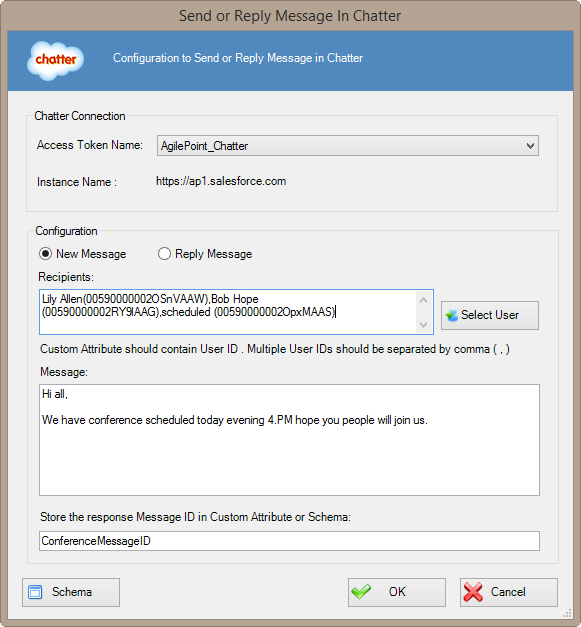
Specifies a private message in Chatter.
How to Start
- In AgilePoint Envision, open a process template.
- Navigate to the Chatter stencil.
- On the Chatter stencil, drag the
Send or Reply Chatter Message AgileShape, and drop it on the process template.
- To view the full list of properties, in the Design Tasks pane, click Show Properties.
- On the Configure field, click the Ellipses button.
Fields
| Field Name |
Definition |
Access Token Name
|
- Definition:
- Specifies the unique
name for your connection to the enterprise social application.
- Allowed Values:
- An alphanumeric string with no spaces.
- Default Value:
- None
- Custom Attributes:
- No
|
New Message / Reply Message
|
- Definition:
- Specifies whether to post a new message or reply to a specified message.
- Allowed Values:
-
- New Message - Sends a new message.
- Reply Message - Sends a reply to a specified message.
- Default Value:
- New Message
|
Recipients / Reply Message To
|
- Definition:
- Specifies the user name or message ID you want to associate with the action.
- Allowed Values:
-
- Recipients - Specifies the user name
from the Select Users Window to which you want
to post a new message.
- Reply Message To - Specifies the ID of the Chatter message thread
to which you want to post a reply message.
- Default Value:
- Recipients
- Custom Attributes:
- Yes
|
Select User
|
- Opens the Following Window:
- Select Users Window
- Purpose of this Window:
- Specifies a Chatter user.
|
Message
|
- Definition:
- Specifies the content of the message.
- Allowed Values:
- Multiple lines of text in text-only format.
- Default Value:
- None
- Custom Attributes:
- Yes
|
Store the response Message ID in Custom Attribute or Schema
|
- Definition:
- Specifies the name of the
custom attribute that is used to store the response Message ID.
The Message ID is an identifier used to track
a Chatter conversation thread.
- Allowed Values:
- A custom attribute.
- Default Value:
- None
- Custom Attributes:
- Yes
- Example:
- /pd:myFields/pd:MessageID
|
Schema
|
- Opens the Following Window:
- Select XPath from Attributes Window
- Purpose of this Window:
- Enables you to select a schema node from the XML schema for
your process.
|