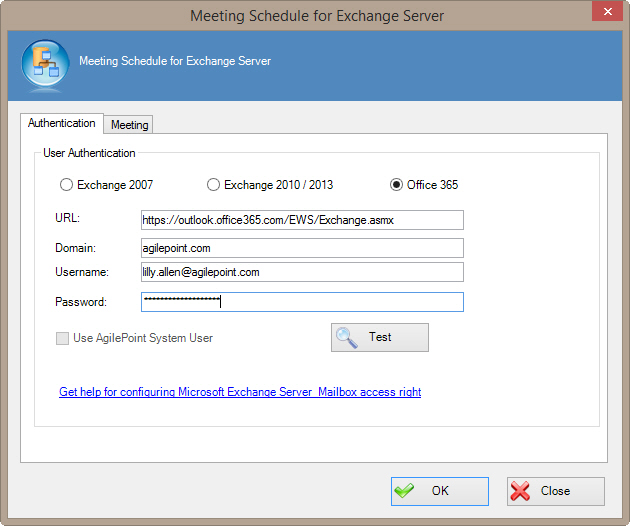
Specifies the authentication mode to be used to access the
Exchange Server and schedule the appointment and the appointment details.
How to Start
- In AgilePoint Envision, open a process template.
- Navigate to the Exchange Server stencil.
- On the Exchange Server stencil, drag the
Create Meeting AgileShape, and drop it on the process template.
- To view the full list of properties, in the Design Tasks pane, click Show Properties.
- On the Configure field, click the Ellipses button.
Fields
| Field Name |
Definition |
Exchange 2007 / Exchange 2010/2013 / Office 365
|
- Definition:
- Specifies the version of your Microsoft Exchange or Email Server.
- Allowed Values:
- Exchange 2007 - Configures this shape to access Exchange Server 2007.
- Exchange 2010/2013 - Configures this shape to access Exchange Server 2010 or 2013.
- Office 365 - Configures this shape to access email on Office 365.
- Default Value:
- Exchange 2007
|
URL
|
- Definition:
- Specifies the Exchange Server URL.
- Allowed Values:
- Exchange 2007 - https://[machine name]:[port]
- Exchange 2010 - https://[machine name]:[port]/EWS/Exchange.asmx
- Default Value:
- https://[MachineName]:[Port]
- Custom Attributes:
- Yes
- Example:
- Exchange 2007 - https://mydomain.com:2030
- Exchange 2010 - https://mydomain.com:2030/EWS/Exchange.asmx
|
Domain
|
- Definition:
- Determines that a specified account to use to access the Exchange Server.
- Allowed Values:
- A valid domain name for user to be specified.
- Default Value:
- None
- Custom Attributes:
- Yes
|
Username
|
- Definition:
- The user name for an Exchange Server administrator.
- Allowed Values:
- A valid user name.
- Default Value:
- None
- Custom Attributes:
- No
|
Password
|
- Definition:
- The password for the authentication account.
- Allowed Values:
- A valid password.
- Default Value:
- None
- Custom Attributes:
- Yes
|
Use AgilePoint System User
|
- Definition:
- Specifies to use the AgilePoint System User credentials to access
the Exchange Server.
The credentials and URL can be verified by clicking the
Test button. The Test button is disabled if Use AgilePoint System User is
checked. In both cases, make sure that the user has proper access rights to the Exchange Server.
- Allowed Values:
- Deselected - Specifies particular user credential to authenticate.
- Selected - Performs authentication using configured system user account.
- Default Value:
- Deselected
|