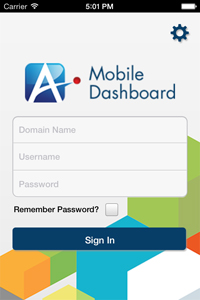
Authenticates you to AgilePoint Mobile Dashboard app.
Navigation
- On your mobile device, open the AgilePoint Mobile Dashboard app.
Field Definitions
| Field Name |
Definition |
|
Settings ( ) )
|
- Opens the Following Window:
- Settings Screen
- Purpose of this Window:
- Specifies the settings for your AgilePoint Mobile Dashboard
app.
|
|
Domain
|
- Definition:
- The authentication domain.
- Allowed Values:
- A valid domain.
- Default Value:
- None
|
|
User Name
|
- Definition:
- Your AgilePoint user name.
- Allowed Values:
- A user name registered in AgilePoint Server.
- Default Value:
- None
|
|
Password
|
- Definition:
- The password for the authentication account.
- Allowed Values:
- A valid password.
- Default Value:
- None
|
|
Remember Password
|
- Definition:
- Specifies whether to store your user name and password
on your device.
- Allowed Values:
-
- Selected - Stores your user name and
password on your device, so you do not have to sign in.
- Deselected - Does not stores your user name and
password.
- Default Value:
- Deselected
|