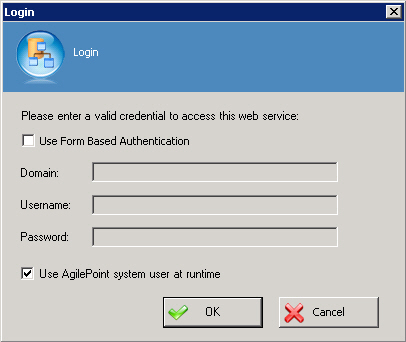
Specifies the authentication credentials to run a web service method at runtime.
Prerequisites
- A valid Web Service — for example
a live, valid WSDL file.
Navigation
- In AgilePoint Envision, open a process template.
- Navigate to the Web Services stencil.
- Drag one of the following AgileShapes, and drop it on the process model:
- Windows Communication Foundation
- Web Service
- To view the entire list of properties, in the Design Tasks pane, click Show Properties.
- On the Credential field, click the Ellipses button.
Field Definitions
| Field Name |
Definition |
Domain
|
- Definition:
- The authentication domain.
This does not apply to Forms-Based Authentication.
|
User Name
|
- Definition:
- The user name you
want to associate with the action.
- Allowed Values:
- A user name, not including the domain.
- Default Value:
- None
- Custom Attributes:
- No
|
Password
|
- Definition:
- The password for the authentication account.
- Allowed Values:
- A valid password.
- Default Value:
- None
- Custom Attributes:
- Yes
|
| Use AgilePoint System User at Runtime |
- Definition:
- Specifies whether to use the AgilePoint system user account
(usually the same as the AgilePoint Service account)
for the action when the process is running.
- Allowed Values:
-
- Selected - Uses the AgilePoint system user account
for the action at runtime.
- Deselected - Uses the credentials specified on this
window at runtime.
- Default Value:
- Deselected
- Custom Attributes:
- No
|